Change Admin Username Mac How To Change Admin Name On Mac MacOS Admin Username Settings YouTube How To Change Admin Name On Mac How To Change Username On MacBook Pro How To Change Admin Name On Mac Login Screen Sonoma How To Change Admin Name On Mac Login Screen Sonoma How To Change Mac Username Home Folder Name Macworld Go to System Preferences Users Groups Control click the user account select Advanced Options and update the Account name Restart your Mac to confirm regular file and folder access This article explains how to change the user name on a Mac Instructions apply to OS X Yosemite 10 10 5 and later
Allow the user to be an administrator for this Mac Allow user to reset password using Apple ID Allow a user to change their password for this Mac at login by entering their Apple ID and password To use this option the user must have set up iCloud on this Mac Steps Involved in Customizing the Admin Name on Mac Word of Caution Here are the steps to change your MacBook or MacBook pro username using system preferences Step 1 Create a New Administrator Account Step 2 Rename the Home Folder Step 3 Rename the Account That s all A Few Limitations
How To Change Mac Username Home Folder Name Macworld CoreDeft Computer Management App How To Change Admin Name On Mac Gossipfunda Admin Login Screenshot Of A Username On A Website On Craiyon How To Change Admin Name On Mac In 3 Easy Steps TechOwns How To Change Admin Name On Mac Login Screen Sonoma Searching For A Username Online On Craiyon New Name Here s How To Change The Username On Your Mac To Match Antzila
Change Admin Username Mac
 Change Admin Username Mac
https://i.ytimg.com/vi/el7C8EkBFRA/maxresdefault.jpg
Steps for Changing the Admin Name In order to change the administrator name on your Mac you must first access the System Preferences To do this select the Apple menu in your main menu bar then choose System Preferences Once the System Preferences window appears select the Users Groups preference pane
Templates are pre-designed files or files that can be used for various purposes. They can conserve effort and time by providing a ready-made format and layout for producing different type of material. Templates can be used for individual or professional tasks, such as resumes, invitations, leaflets, newsletters, reports, discussions, and more.
Change Admin Username Mac

Globe Default Admin Password And Username 2024 Fiber DSL LTE

CoreDeft Computer Management App

How To Change Admin Name On Mac Gossipfunda

Admin Login
How To Change Admin Name On Mac In 3 Easy Steps TechOwns

How To Change Admin Name On Mac Login Screen Sonoma

You need to use a new user account to change an admin name on your MacBook Log out of your current user account and log in to the login screen Select the new administrator account and log in
The Users folder will open In the Users folder select the folder of the account you re renaming then press Return and enter the new name Don t use any spaces in the new name When prompted enter the name and password of the administrator account you ve just used to log in

Then enter the new admin account name and password Now you are all set to change the username of your usual account Follow these steps to change the username Open System Preferences

In this tutorial we ll detail the best way to change the admin name on your Mac Changing Your macOS Admin Name To rename your macOS admin name there are a few things to keep in mind First of all it is mandatory to log out of the admin account you want to rename and log in to another admin account

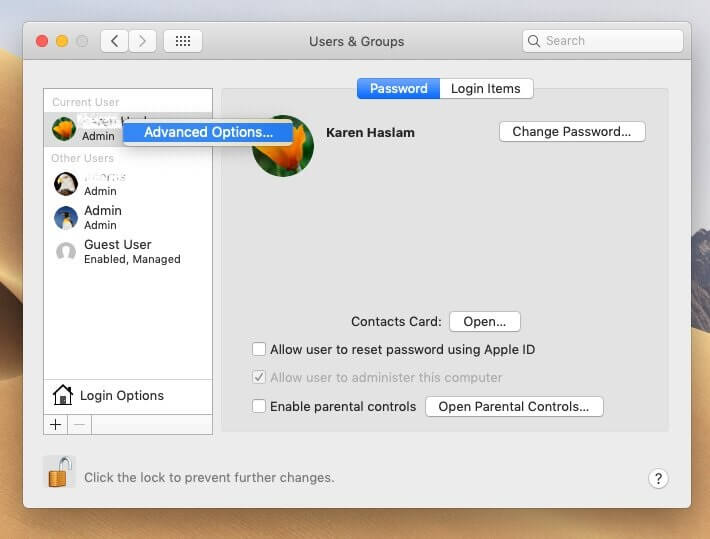
Go to System Preferences Click Users Groups Then you should click the padlock icon if it s closed which will prompt you to enter the user name and password for the separate account you are logged into The padlock should then appear open On the list of users to the left hit the control key and click the account you wish to rename
1 Navigate to Apple Logo Choose System Settings System Settings on Mac 2 Click on Users Groups From the next side panel Right click on Username And Click on Advanced Options user advanced options on mac 3 Enter your Mac Login Password to Verify and unlock the changes change admin name on mac Now here s how to change the admin name on your Mac You must be logged out of the account you want to rename and you must be logged in to an administrator account For more on that read through our article on adding and editing Mac users Open System Preferences Click Users Groups
You can change your username on your account any time you want as long as you have the right administrator password Here s how to change your username on a Mac without creating any