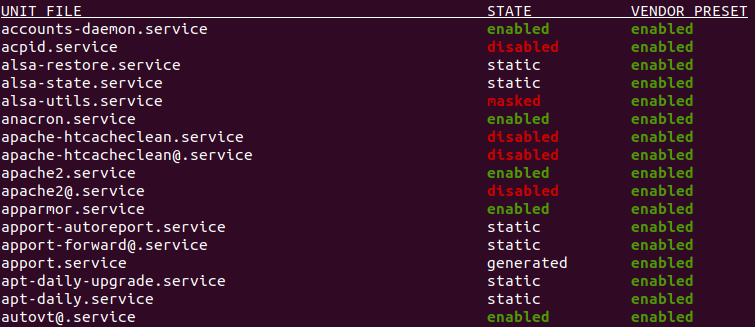
Centos 7 List Installed Services Linux RHEL CentOS 7 How To Disable A Service In Windows 10 How To List Installed Packages On CentOS Linuxize To list all the services running on a CentOS server use the following command systemctl list unit files type service This command will display a list of all
10 commands to list all systemctl services with status Written By admin August 4 2020 Table of Contents Are you new to systemd and systemctl systemctl 1 List All the Available Services Systemctl provides a wide range of information about all the available services on your Linux systems To list all available services use the all option Use the following
How To List Installed Packages On CentOS Linuxize 3 Ways To List All Installed Packages In RHEL CentOS And Fedora How To Install Gnome GUI On CentOS 7 RHEL 7 Linux Systems MimasTech Linux Technical Blog 57 Data Transfer Objects Specification OSGi Core 7 How To Check And List All Services In CentOS RHEL 6 7 8 Linux OSETC TECH Verify List All Installed Packages In RHEL CentOS And Fedora Linux Tutorial And Something Lg Xnote Rd400 Drivers For Mac
Centos 7 List Installed Services
 Centos 7 List Installed Services
https://devconnected.com/wp-content/uploads/2020/12/list-installed-services.png
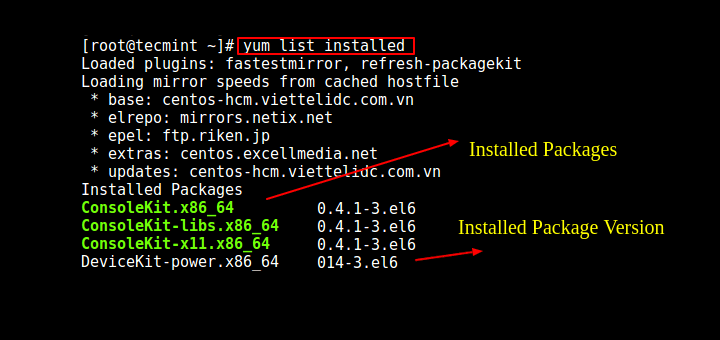
The procedure is as follows to list installed packages Open the terminal app For remote server log in using the ssh command ssh user centos linux server IP here Show information about all
Pre-crafted templates provide a time-saving option for developing a varied range of files and files. These pre-designed formats and layouts can be made use of for different individual and professional tasks, consisting of resumes, invites, leaflets, newsletters, reports, presentations, and more, enhancing the content production procedure.
Centos 7 List Installed Services

How To Start Stop And Get Status Of Linux Service With Systemd POFTUT
3 Ways To List All Installed Packages In RHEL CentOS And Fedora

How To Install Gnome GUI On CentOS 7 RHEL 7 Linux Systems MimasTech Linux Technical Blog

57 Data Transfer Objects Specification OSGi Core 7


Use systemctl type service state running to see all running services on a Linux system with systemd It provides details like name load sub state and description Systemd is a system and

List All Running Services on CentOS 7 8 If you want to list all running services in CentOS 7 or CentOS 8 system and you can use the below systemctl command type systemctl list units type service

The easiest way to list services on Linux when you are on a systemd system is to use the systemctl command followed by list units You can specify the type service option in order to restrict the results
To display a list of installed packages enter the following in a terminal window sudo rpm qa The q option means query The a option means all To list

To get a list of the installed services on the shell you may use this command on Fedora RedHat CentOS SuSE and Mandriva chkconfig list About Till Brehm
Install WantedBy default target Once you have created the unit file with all the necessary configuration options save the file and set the correct file permissions To list all packages and their install dates latest first rpm qa last Share Follow edited May 18 2018 at 12 08 mwfearnley 1 106 1 16 19 answered Aug 14
To list the installed packages on your CentOS system with yum use the following command sudo yum list installed It will print a list of all installed packages