Canvas App Text Function Excel With Hari Test The TEXT Function Using DataSourceInfo And RecordInfo Function For Checking Permissions For A Dataverse Table Or PowerFx SUM Canvas App Get Started With Formulas In Canvas Apps Power Apps Microsoft Learn Filter Gallery By Dropdown List In Canvas Apps Power Apps Softchief Learn Description An HTML text control not only shows plain text and numbers but also converts HTML tags such as non breaking spaces Note HTML text control assumes the HtmlText is relatively positioned If you need to use an absolute position for your HTML text wrap the text around a relatively positioned div
Description The user can specify data by typing into a text input control Depending on how you configure the app that data might be added to a data source used to calculate a temporary value or incorporated in some other way Key properties Default The initial value of a control before it is changed by the user Text Launch Launches a webpage or a canvas app address parameter name1 parameter value1 parameter name2 parameter value2 target Param Access parameters passed to a canvas app when launched If you have any questions about The Complete Power Apps Functions List please leave a message in the comments section below You can post using
Filter Gallery By Dropdown List In Canvas Apps Power Apps Softchief Learn Excel Templates Tips And Tricks Conquer Your Spreadsheet Power Apps Power Automate Power BI Azure Architecture Center Microsoft Docs PowerApps Collect Function How To Improve Your Canvas App Performance Arpit Power Guide Understand Canvas app Forms Power Apps Microsoft Docs App Form Form Control Argument Samsung s New AR Canvas App Lets You Add AR Elements To Your Surroundings 3 Canvas Apps Features To Build And Level Up Your App Development CRM Software Blog Dynamics 365 Tkinter Canvas Text Delft Stack Future Vision Artifact And Reflection A Resource Created For Students And Teachers To Find
Canvas App Text Function
 Canvas App Text Function
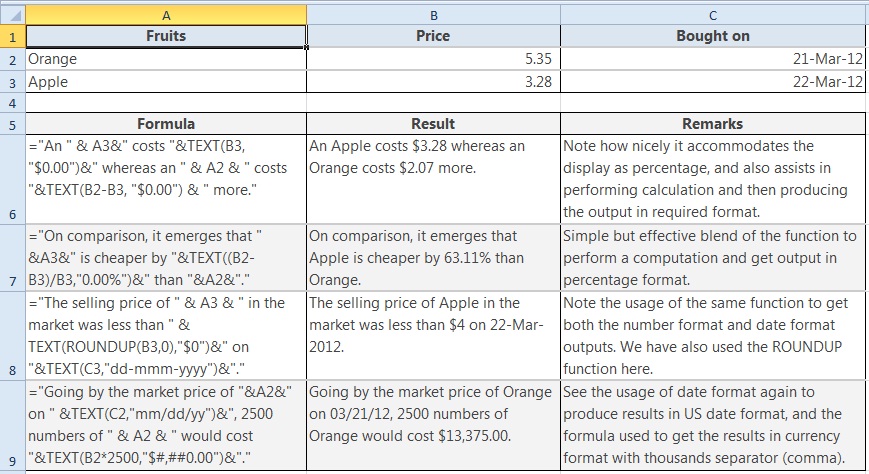
https://3.bp.blogspot.com/-7LyTrtbq5mc/UH2RHx5WEjI/AAAAAAAAGxI/pdooyK-_b64/s1600/TextFunction.jpg
Configure your canvas app with formulas that not only calculate values and perform other tasks as they do in Excel but also respond to user input as an app requires n In Excel you build formulas that for example populate cells and create tables and charts
Templates are pre-designed files or files that can be used for different functions. They can conserve time and effort by supplying a ready-made format and layout for producing different type of material. Templates can be utilized for individual or expert jobs, such as resumes, invites, leaflets, newsletters, reports, presentations, and more.
Canvas App Text Function

Embed Canvas App Into Model Driven App Full Tutorial
Excel Templates Tips And Tricks Conquer Your Spreadsheet
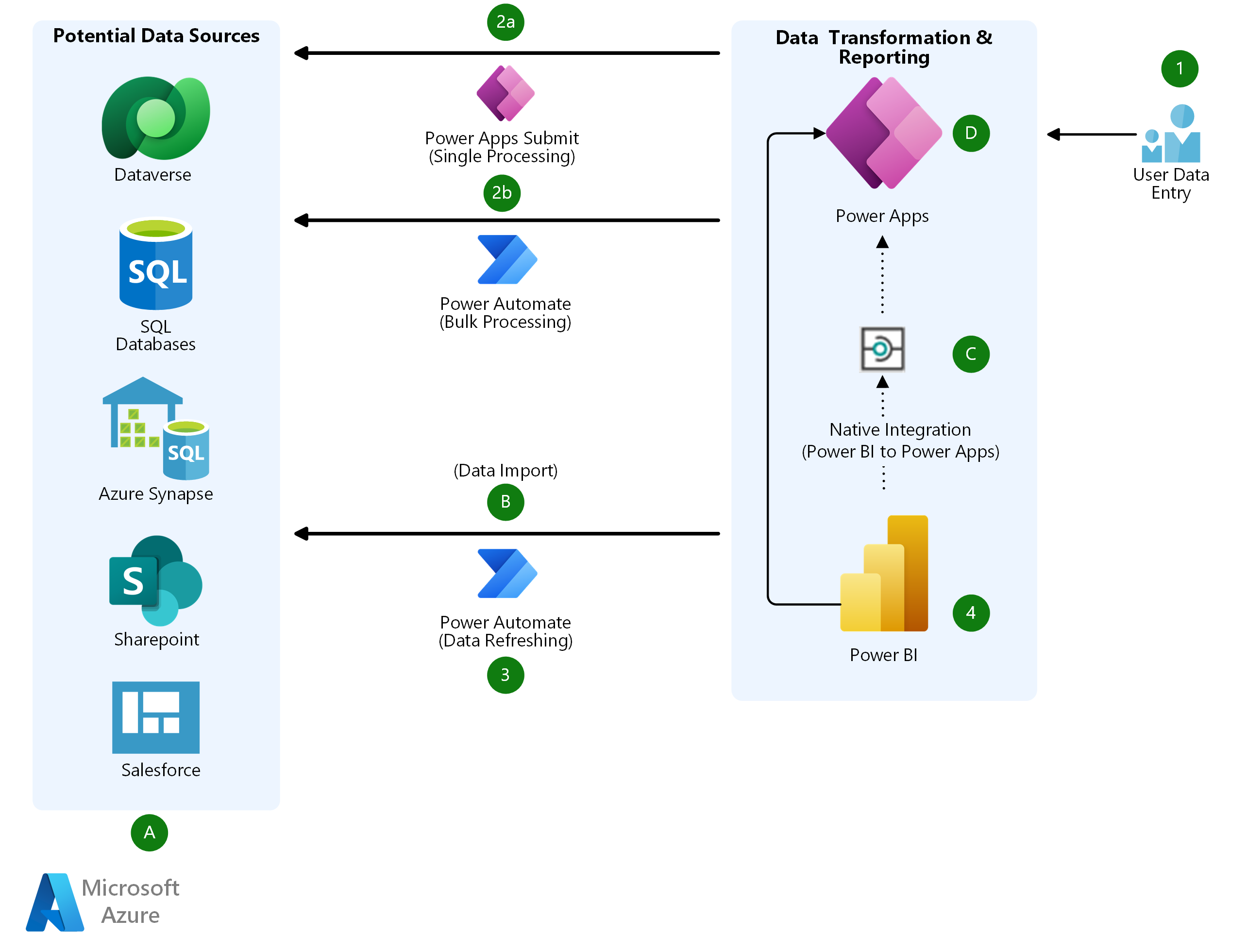
Power Apps Power Automate Power BI Azure Architecture Center Microsoft Docs

PowerApps Collect Function How To Improve Your Canvas App Performance Arpit Power Guide

Samsung s New AR Canvas App Lets You Add AR Elements To Your Surroundings

3 Canvas Apps Features To Build And Level Up Your App Development CRM Software Blog Dynamics 365
Power Apps Text Functions With Examples Posted by Matthew Devaney on March 22 2021 9 Comments Text is the most common data type in Power Apps Often it needs to be manipulated in some way extract part of the text format it differently or remove unnecessary spaces or symbols Power Apps text functions can do all of these things and more

A B C D Show 18 more In this article learn about all the functions available in Power Apps Formulas in Power Apps combine many elements Listed below are Functions take parameters perform an operation and return a value For example Sqrt 25 returns 5 Functions are modeled after Microsoft Excel functions

In Power Apps add dates and times to a canvas app and format them to show the right level of detail or to reflect your locale Calculate the amount of time between two dates or calculate a date that s a certain amount of time before or after a date that you specify

Configure your canvas app with formulas that not only calculate values and perform other tasks as they do in Excel but also respond to user input as an app requires In Excel you build formulas that for example populate cells and create tables and charts In Power Apps you build similar formulas as you configure controls instead of cells

Applies to Canvas apps Model driven apps Dataverse formula columns Power Platform CLI Extracts the left middle or right portion of a string of text Description The Left Mid and Right functions return a portion of a string Left returns the beginning characters of a string Mid returns the middle characters of a string
Create a TextInput and in the onChange function insert Set var1 Value TextInput1 Text Create a second TextInput and in the onChange function insert Set var2 Value TextInput2 Text Create a Label and in the Text function insert var1 var2 Every time you change the values in the TextInputfields the Label will be updated This new function dramatically simplifies working with JSON in Canvas apps For example we recently worked with a customer who needed to extract information from a relatively simple JSON string stored in a Dataverse table to use the TextField in the text property of a label control the Text function has to be used to convert the
n Key properties n Color The color of text in a control n Font The name of the family of fonts in which text appears n HtmlText Text that appears in an HTML text control and that may contain HTML tags n Additional properties n BorderColor The color of a control s border n BorderStyle Whether a control s border is Solid Dashed Dotted or None