Cannot Empty Deleted Items Folder In Office 365 How To Create A Shared Folder In Office 365 YouTube Recover Deleted Items From Server Outlook 2010 Vitalop How To Empty The Deleted Items Folder In Outlook 2013 Solve Your Tech How To Empty Deleted Items In Outlook YouTube Quicky Cannot Empty Deleted Items Folder In Outlook Software Unable to delete emails in Outlook 365 playback doesn t begin shortly try restarting
The user is trying to empty out Deleted Items in Outlook and it throws You can t permanently delete these items How to delete emails in outlook 365 The simplest approach to making room in your Outlook
Quicky Cannot Empty Deleted Items Folder In Outlook Software How To Empty The Deleted Items Folder In Outlook 2013 Solve Your Tech Outlook 2013 te Silinmi eler Klas r n Bo altma How To Automatically Empty The Deleted Items Folder When Exiting Outlook Tips To Solve The Deleted Items Folder Is Unavailable Error In Outlook How To Empty The Deleted Items Folder In Outlook YouTube How To Create Folder To Organize Office 365 Outlook Office 365 Support IT Solutions That Work Automatically Empty Deleted Items Folder How To Recover Deleted Calendar Items And Mails In Outlook
Cannot Empty Deleted Items Folder In Office 365
 Cannot Empty Deleted Items Folder In Office 365
https://i.ytimg.com/vi/KXy3aGvGk5E/maxresdefault.jpg
Method 1 Remove Problematic or Faulty Add Ins Method 2 Check Subscribed Folder Settings Method 3 Delete Emails via Web Method 4 Repair
Templates are pre-designed documents or files that can be used for different functions. They can conserve effort and time by supplying a ready-made format and design for producing different sort of content. Templates can be used for individual or professional tasks, such as resumes, invites, flyers, newsletters, reports, discussions, and more.
Cannot Empty Deleted Items Folder In Office 365
Cannot Delete Emails Or Folders In Outlook

How To Empty The Deleted Items Folder In Outlook 2013 Solve Your Tech
Outlook 2013 te Silinmi eler Klas r n Bo altma

How To Automatically Empty The Deleted Items Folder When Exiting Outlook

How To Empty The Deleted Items Folder In Outlook YouTube
How To Create Folder To Organize Office 365 Outlook Office 365 Support
In this situation it s expected behavior that you can t clear up the Deleted Item folder

Its giving me error You can t permanently delete these items Try deleting your recoverable items folder If that doesn t work contact your IT

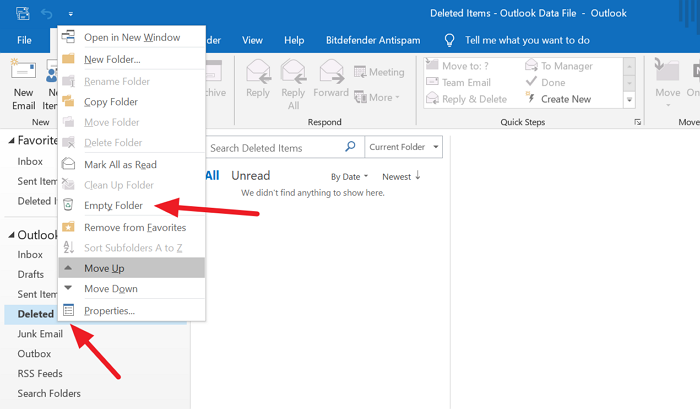
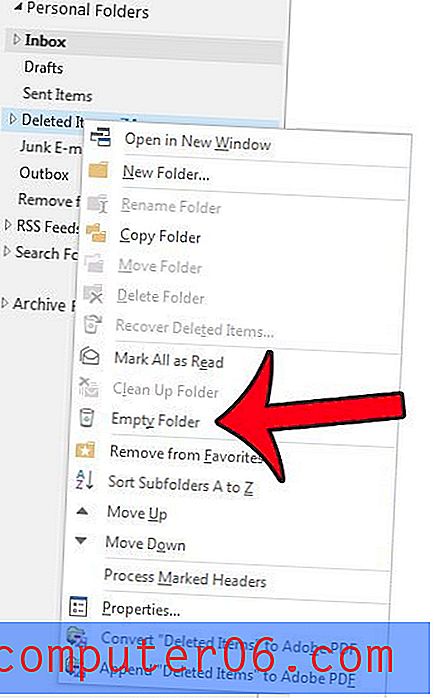
Step 1 Open Outlook go to Bin Deleted Folder and right click on it Step 2 Click on Empty Folder Step 3 Now Log Out of Outlook Step 4 Now Restart

Try emptying the Deleted Items folder and then log out Alternatively press the Shift key while clicking the Delete button to hard delete your

Run Outlook Hold down CONTROL key and then in the folder list click the Trash or the Deleted Items folder Click Empty Folder
Outlook on the Web Under Mail click Message options Within Messaging options uncheck or check the Empty the Deleted Items folder when I Manually emptying the deleted items folder 1 In Office 365 Email locate the Deleted Items folder Illustrative image 2 Right click the Deleted Items folder
When you delete items from a folder in a mailbox the items first are moved to the Deleted Items folder in the mailbox