Can You Color Code Iphone Calendar The 8 Best Calendar Apps For Your IPhone How To Hide Calendars In The Calendar App For IPhone And IPad IMore Don t Miss The List Views In The IPhone s Calendar App Mac Business Here Are The Different Ways You Can View Your IPhone s Calendar Changer Couleur Calendrier Iphone 2021 Web Nov 25 2023 nbsp 0183 32 Yes you can change the color of all calendars at once by following these steps Open the Calendar app on your iPhone Tap on the Calendars tab at the bottom of the screen Tap on the Edit button at the top right corner of the screen Tap on the Color option that appears next to each calendar
Web Mar 18 2018 nbsp 0183 32 Apple s Calendar app doesn t support color coding directly you can t have a single calendar and then decide which color each event should be So if you only use a single personal Web Apr 29 2019 nbsp 0183 32 With that in mind here s how you can color code your calendar for maximum productivity Color your meetings grey According to Helpscout grey represents balance Use grey for highlighting your meetings Using a bland color for meetings maintains a balance needed to run a meeting successfully
Changer Couleur Calendrier Iphone 2021 IOS 16 Lock Screen Calendar Widget Ask Different What Color Codes Does Canva Use Seethetemplates How To Color Code In Google Calendar Robots How To Use Calendar For IPhone And IPad The Ultimate Guide IMore Printable Princess Color By Number Pages Printable JD How To Color Code Your IOS Calendar The IPhone FAQ How To Share Calendar Events On IPhone And IPad IMore Print Calendar From Iphone 5 Calendar Printables Free Templates
Can You Color Code Iphone Calendar
 Can You Color Code Iphone Calendar
https://static1.makeuseofimages.com/wp-content/uploads/2019/07/iphone-calendar-apps.jpg
Web In macOS Control right click the calendar entry in the left hand sidebar and choose an existing color or choose Custom Color In iOS iPadOS tap the button at the bottom of the Calendar app tap the i info icon to the right of a calendar entry and tap the name under You can choose a color from the list or tap
Templates are pre-designed files or files that can be utilized for different purposes. They can save time and effort by supplying a ready-made format and design for producing various sort of material. Templates can be utilized for personal or professional projects, such as resumes, invitations, flyers, newsletters, reports, presentations, and more.
Can You Color Code Iphone Calendar
How To Use Calendar For IPhone And IPad The Ultimate Guide IMore

IOS 16 Lock Screen Calendar Widget Ask Different

What Color Codes Does Canva Use Seethetemplates
How To Color Code In Google Calendar Robots

Printable Princess Color By Number Pages Printable JD
How To Color Code Your IOS Calendar The IPhone FAQ

Web 769 points Aug 30 2022 9 52 AM in response to 76dncr You can categorise your events into calendars These calendars and their colours can be individually customised

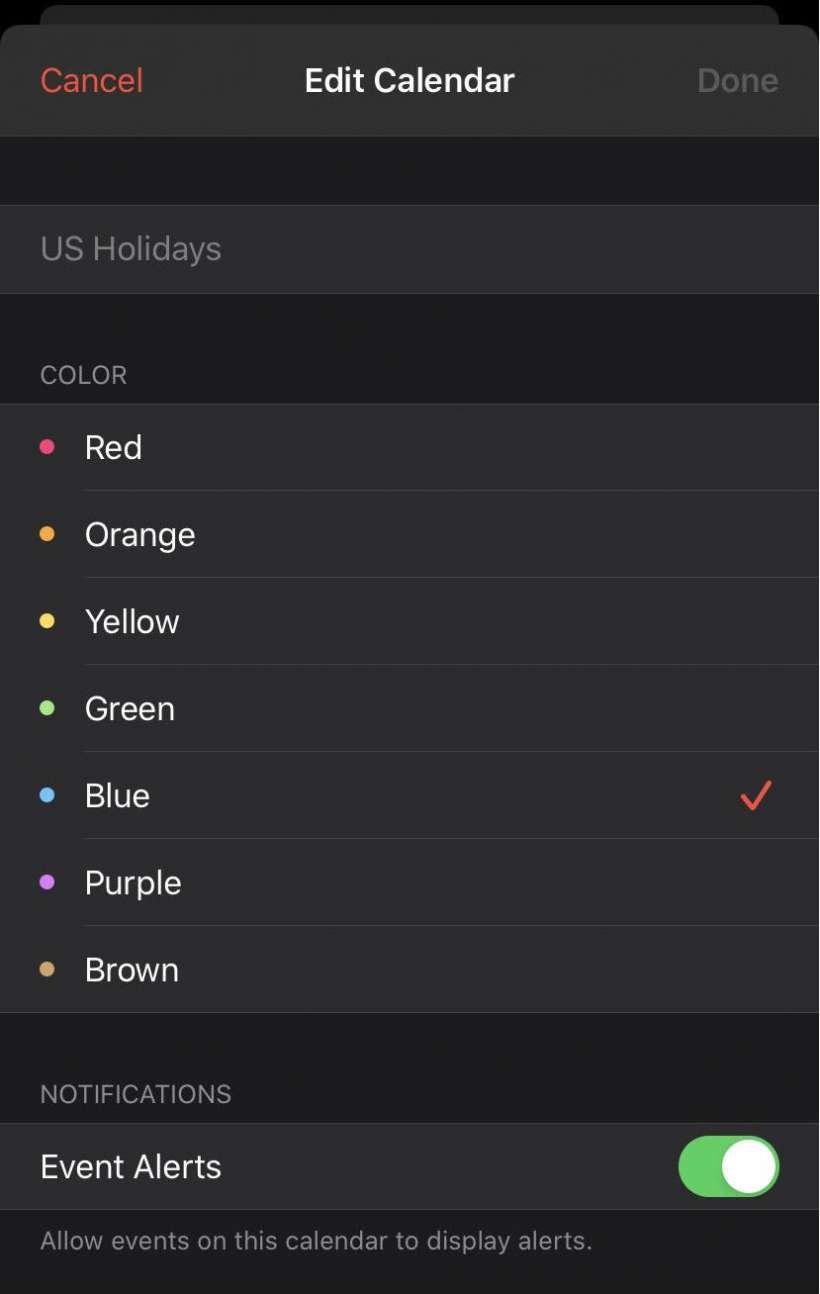
Web Feb 19 2020 nbsp 0183 32 Open the Calendar app on your device Tap Calendars Tap the circle with an quot i quot next to the category you want to color code Select one of the seven colors Now events will be marked in different colors when you tap a specific date

Web Apple offers color coding in the Finder with Tags and similar color coding appears in most software that lets you create entries that work well with category divisions Well you

Web Jul 19 2022 nbsp 0183 32 You can choose a solid color for your Apple Calendar from a list of options or even opt for a custom color Here are the steps to changing the color of a calendar on your iPhone or iPad Open the Calendar app and tap Calendars at the bottom You will see a list of all your calendars here

Web Feb 25 2021 nbsp 0183 32 Color Coding iPhone Calendar I find all the dots in the calendar confusing as to what are appointments and what are holidays I wish I could color code them Would other users find that helpful too Re Titled by Moderator Show moreLess Posted on Feb 25 2021 8 30 AM Reply Me too 1 Me too 1 Me too Similar questions 1881 1281
Web Sep 15 2020 nbsp 0183 32 Change Calendar colors on iPhone and iPad Open the Calendar app and tap Calendars or the Calendar icon to show your list Tap the Info icon to the right of the calendar s name and then tap the current color Choose a color from the list This places a checkmark next to the one you pick Web Mar 19 2014 nbsp 0183 32 Anyway yes you can color code your Calendar events directly from your iPhone or iPad and it s easy to do Just to be clear what we ll be doing is color coding the individual calendars in the iOS Calendar app that is the Home Work Birthday and various other calendars you ve set up
Web Jul 4 2022 nbsp 0183 32 On your iPhone launch Calendar Tap Calendars Scroll to the calendar you want the color changed Tap its i icon Tap Color Select the preferred color then tap Back Tap Done