Can Error 4013 Be Fixed Grass 110 Degree Hinge For Frameless Overlay Cabinets 48 Mm Screw Hole Spacing Bundle IPhone 8 Error 9 Error 4013 Fixed ITunes 3utools Surprise Result iphone8 iphonerepair Best 8 Ways To Fix IPhone Error 4013 IOS16 Support Edge On View Of NGC 4013 ESA Hubble Best 8 Ways To Fix IPhone Error 4013 IOS16 Support If you are running into error 4013 every time you try to restore your phone using iTunes the method in this video will help you fix it and complete the restore Get ReiBoot here
Method 1 Force Restart iPhone While Charging Most random firmware crashes can be solved with a force restart or a hard reset and error 4013 is no different You can fix it by force starting your iPhone I will show you how to perform it below First ensure your iPhone has enough battery left 1 Update macOS or iTunes Error 4013 is most commonly caused by incompatibility with your current version of macOS or iTunes on Windows You can check if any new macOS updates are available by clicking Apple logo System Settings Software Update
Best 8 Ways To Fix IPhone Error 4013 IOS16 Support RackSolutions 1U Heavy Duty Fixed Rack Shelf 28in D Fix Error 4013 On IPhone Archives Android Data Recovery Blog The IPhone Could Not Be Restored An Unknown Error Occurred 9 Or 4013 MacReports Solved How To Fix IPhone Could Not Be Restored Error 4013 IPhone Error 4013 4014 Occurred During Restoring Fixed CD4013 A Basic CMOS Chip With Two D Flip Flops How To Fix IPhone Error 4013 IPhone Could Not Be Restored On IOS 14 IPhone 11 XS XR X 8 7 Aluminium Louvre Awnings
Can Error 4013 Be Fixed
 Can Error 4013 Be Fixed
https://m.media-amazon.com/images/I/71fPWUK-y4L.jpg
Open iTunes on your computer If you re using a Mac click on iTunes in the top menu and then select Check for Updates If you re using a Windows PC go to Help and select Check for Updates
Pre-crafted templates provide a time-saving service for producing a varied series of files and files. These pre-designed formats and designs can be used for various personal and professional tasks, consisting of resumes, invites, flyers, newsletters, reports, discussions, and more, simplifying the content production process.
Can Error 4013 Be Fixed
How To Factory Reset Apple Computer Without Password Teliox

RackSolutions 1U Heavy Duty Fixed Rack Shelf 28in D

Fix Error 4013 On IPhone Archives Android Data Recovery Blog

The IPhone Could Not Be Restored An Unknown Error Occurred 9 Or 4013 MacReports

IPhone Error 4013 4014 Occurred During Restoring Fixed

CD4013 A Basic CMOS Chip With Two D Flip Flops

To fix an iPhone error 4013 follow these steps in this order Update iTunes to the latest version The most common cause of iPhone error 4013 is software Because iTunes is essential to both restoring and updating you must have the latest version of iTunes You could be running into this error because your version of iTunes is out of date

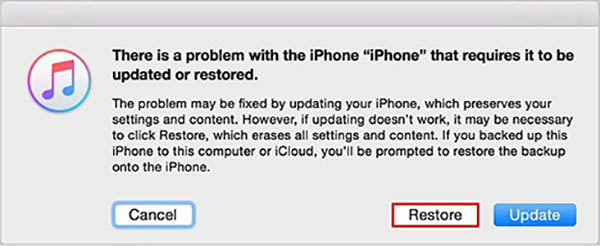
Error 4013 indicates a communication problem has occurred between your device and your computer The message can show up when restoring anything from an iPod classic to the latest iPhone 14

Error 4013 is an updating or restoring error that can hit any device running iOS like an iPad or iPod Touch This issue arises when you are attempting to update or restore your device

An unknown error occurred 4013 The iPhone device name could not be restored An unknown error occurred 4014 Try these steps Make sure that your Mac has the latest version of macOS or the latest version of iTunes Force your device to restart

How To Fix iPhone Restoration Failed By iTunes or Fix Error Code 4013 YouTube To fix an iPhone error 4013 follow these steps in this order Install the latest version of
IPhone X Released November 4 2017 Model A1865 A1901 Available as GSM or CDMA 64 or 256 GB Silver or Space Gray Pronounced the same as iPhone 10 Step 2 Similarly make sure your Mac or Windows PC is running the latest version of its own operating software To do this go to the App Store to update MacOS or click on the Apple logo and then press Software Update To update Windows 10 go to Settings Update Security Windows Update Step 3 Force restart your iPhone or iOS device
Let s skip past the usual suspects like YouTube WhatsApp and Instagram I want to share with you some less familiar apps that have become