Camera Light Settings Low Light Camera Settings Photography Pinterest Tips For Photographing The Northern Lights Luxe Adventure Traveler Windows 10 Webcam Settings Guidethreads Camera Light Settings TrainBoard The Internet s Original Camera Settings For Portraits Indoor Outdoor Group Portrait Web Oct 6 2023 nbsp 0183 32 You can tap any of the four on screen buttons to move between 5X 1X 2X and 3X 5X zoom levels How to master the camera app on iPhone 15 Pro Main camera focal lengths The Main camera has an
Web Nov 25 2022 nbsp 0183 32 Step 1 Open the Settings app Go to Devices gt Cameras page If the Cameras page is missing it is either because you Step 2 The Cameras page displays all connected cameras to your PC including the built in webcam The built in webcam Step 3 As you can see in the picture below you can Web May 5 2022 nbsp 0183 32 ISO refers to how sensitive your camera is to light The higher the ISO setting the more sensitive your camera is and the better it is for night photography as it ll produce brighter photos However the drawback is that at higher ISO settings you get increased digital noise this can reduce the overall quality of your photos
Camera Settings For Portraits Indoor Outdoor Group Portrait Question Issues With Microsoft LifeCam Cinema Tom s Hardware Forum Fujifilm INSTAX Mini 8 Camera Review Wear Tested Quick And Precise 14 Tips Camera Settings For Low Light Shooting Fill Light Photography Improve Photography Photography Settings Manual Camera Settings For Photographing Newborn Babies My Manual Genaray LED 5300 120 LED Dimmable Compact On Camera Light Canon Digital Camera Settings Photopostsblog My Beloved Vintage Camera Collection
Camera Light Settings
 Camera Light Settings
http://media-cache-ec0.pinimg.com/736x/dc/92/fc/dc92fc6c41f69cc9bada452c3021eba7.jpg
Web 1 day ago nbsp 0183 32 Read Later Winnipeg police are testing a new type of traffic camera at the intersection of Portage Avenue and Mount Royal Road The camera was installed on Oct 5 as part of an approximately 30
Pre-crafted templates use a time-saving solution for creating a varied variety of files and files. These pre-designed formats and designs can be utilized for different individual and expert jobs, consisting of resumes, invitations, flyers, newsletters, reports, discussions, and more, simplifying the material production procedure.
Camera Light Settings

Elinchrom Sd tyo Photography Studio Setup Studio Photography
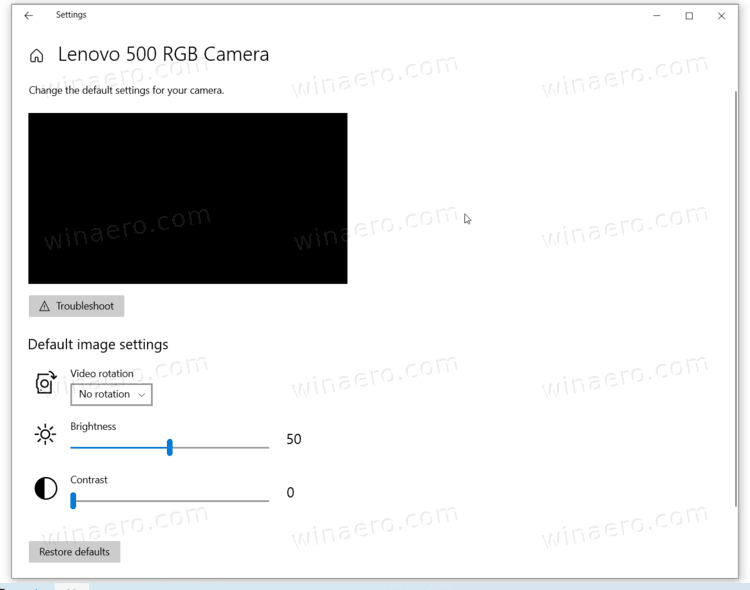
Question Issues With Microsoft LifeCam Cinema Tom s Hardware Forum
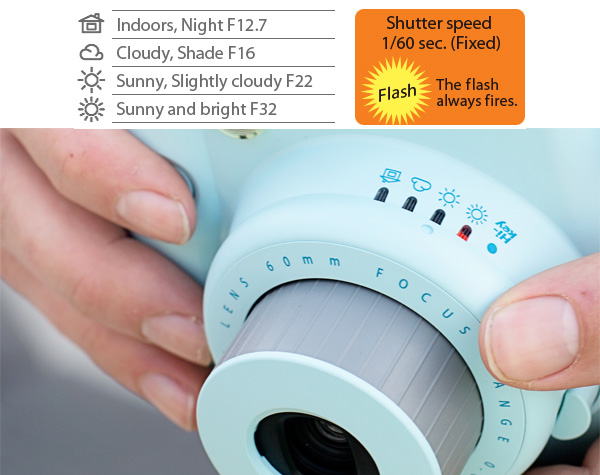
Fujifilm INSTAX Mini 8 Camera Review Wear Tested Quick And Precise

14 Tips Camera Settings For Low Light Shooting

Manual Camera Settings For Photographing Newborn Babies My Manual

Genaray LED 5300 120 LED Dimmable Compact On Camera Light

Web Apr 8 2021 nbsp 0183 32 Change Camera Brightness and Contrast in Windows 10 Open Settings Go to Devices and click on Cameras in the left pane Navigate to the Cameras section on the right and find the camera you want to adjust image parameters for Click on it to select and click on the Configure button On the next

Web Change webcam brightness and contrast in Windows 10 Open Windows Settings in any way you like For example using the Win I keys Go to Devices gt Cameras In the Cameras list find the webcam or IP camera you want to configure Click on the camera and then select Configure On the next page you will see the options available for

Web Sep 20 2021 nbsp 0183 32 Follow TheWindowsClub Learn how to adjust change increase or decrease web camera brightness and contrast in Windows 11 via the Photos app or Settings
Web The Best Camera Settings For Low Light Photography Are Mode Manual Shutter 1 1 60 ISO 1200 1800 Aperture F 2 8 or wider Focus Manual Focus MF White Balance AWB Drive Mode Single Shot Image Type RAW Tripod Yes

Web Oct 30 2020 nbsp 0183 32 Manage webcam brightness and contrast Download and run Webcam Settings Open the Available webcams dropdown and select a webcam Click Settings In the panel that opens use the various sliders to change the brightness contrast hue sharpness etc of the camera Click Ok to save the changes
Web Sep 3 2021 nbsp 0183 32 This post will guide you on how to change the camera brightness on your Windows 10 11 PC Here s how Method 1 By Enabling the Pro Mode This method will help you to adjust the web camera brightness directly from the camera app settings by enabling the pro mode It s quite easy Let s see how Web Apr 27 2022 nbsp 0183 32 Tip 1 Use a tripod and shutter release cable Tip 2 Use your camera s RAW setting whenever possible Tip 3 Consider a wider aperture or a faster lens Tip 4 Increase your camera s ISO setting and use DeNoise AI to remove the resulting noise Tip 5 Take bracketed exposures for HDR tone mapping Wrapping it up Introduction
Web In a nutshell these are the best basic camera settings in photography Aperture f 1 8 f 5 6 in low light or for a narrower depth of field and f 8 f 16 for a wider DoF Shutter Speed From 30 seconds to 1 4000 th of a second depending on the scene ISO 100 3200 in entry level cameras and 100 6400 in more advanced cameras