Bullets In Unordered List Html How To Remove Bullets From Unordered Lists In HTML Unordered List In HTML An Essential Tool For Structuring Web Content How To Remove Bullets From An Unordered List In CSS YouTube HTML Bullets In Unordered List Not Contained Within The Block YouTube HTML Bullet Points How To Create An Unordered List With The Tag Example Web The items in unordered lists are marked with bullets small black circles by default However the default bullet style for the list items can be changed using a type attribute The type attribute is used to change the default bullet style for the list items
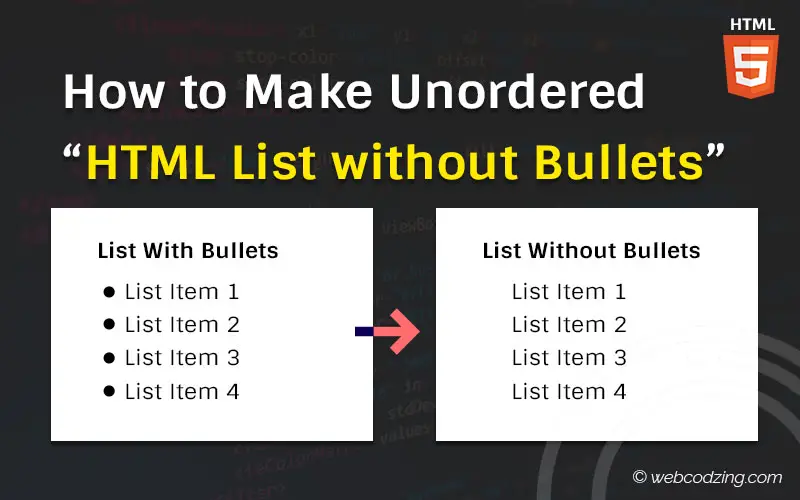
Web Oct 4 2023 nbsp 0183 32 They are typically displayed with bullet points which make them visually distinct from ordered lists An example might be a grocery shopping list To create an unordered list you can use the lt ul gt unordered list element and nest individual list items within lt li gt list item elements lt ul gt lt li gt Item 1 lt li gt lt li gt Item 2 lt li gt lt li gt Item 3 lt li gt lt ul gt Web In HTML we use the lt ul gt tag to create an unordered list For example lt ul gt lt li gt Apple lt li gt lt li gt Mango lt li gt lt li gt Orange lt li gt lt li gt Banana lt li gt lt ul gt Browser Output Each item of the list is enclosed inside the lt li gt tag and they are represented by the dot bullet point symbol
HTML Bullet Points How To Create An Unordered List With The Tag Example How To Make Unordered List Without Bullets HTML WebCodzing How To Center Unordered List html Unordered List unorder List In Html List In HTML Definition Ordered Unordered Lesson Study Basic HTML Lists In HTML Ordered List And Unordered List In MS Word Bulleted And Numbering Create A Bulleted Unordered List FreeCodeCamp Review Html Css HTML Tutorial HTML Ordered And Unordered Lists YouTube List Bullets Points Bullet Unordered Lists Icon Download On
Bullets In Unordered List Html
 Bullets In Unordered List Html
https://sabe.io/blog/html-remove-bullets-unordered-lists/hero.png
Web HTML Unordered List or Bulleted List displays elements in bulleted format We can use unordered list where we do not need to display items in any particular order The HTML ul tag is used for the unordered list There can be 4
Templates are pre-designed documents or files that can be used for numerous functions. They can save effort and time by providing a ready-made format and layout for developing various sort of content. Templates can be utilized for personal or professional jobs, such as resumes, invitations, flyers, newsletters, reports, presentations, and more.
Bullets In Unordered List Html

How To Customize CSS List Style Type Of Each Item
How To Make Unordered List Without Bullets HTML WebCodzing

How To Center Unordered List html Unordered List unorder List In Html

List In HTML Definition Ordered Unordered Lesson Study
Ordered List And Unordered List In MS Word Bulleted And Numbering
Create A Bulleted Unordered List FreeCodeCamp Review Html Css
Web Jul 1 2021 nbsp 0183 32 We use the lt ul gt tag to create an unordered list As usual we need to use the lt li gt tags within lt ul gt and lt ul gt to create the list items The list items li inside the unordered list ul come with the default style of bullet points so each of the list items is preceded by a black dot

Web Mar 25 2024 nbsp 0183 32 The lt ul gt element is for grouping a collection of items that do not have a numerical ordering and their order in the list is meaningless Typically unordered list items are displayed with a bullet which can be of several forms like a dot a circle or a square

Web Sep 30 2021 nbsp 0183 32 Unordered lists in HTML are collections of items that don t need to be in any specific order We often use simple bullet points to list out these items You create an unordered list using the ul tag Then you use the li tag to list each and every one of the items you want your list to include

Web Item An ordered HTML list First item Second item Third item Fourth item Try it Yourself 187 Unordered HTML List An unordered list starts with the lt ul gt tag Each list item starts with the lt li gt tag The list items will be marked with bullets small black circles by default Example lt ul gt lt li gt Coffee lt li gt lt li gt Tea lt li gt lt li gt Milk lt li gt lt ul gt

Web Mark up content in a HTML file as bullet points in unordered and ordered lists Create responsive styles in CSS to display unordered and ordered lists in web pages You can view a finished version of this project by clicking the image below Contents About list and bullets The two parts of a list Your two work files base 4 html and base 4 css
Web An unordered list typically is a bulleted list of items HTML 3 0 gives you the ability to customise the bullets to do without bullets and to wrap list items horizontally or vertically for multicolumn lists The opening list tag must be lt UL gt It is followed by an optional list header lt LH gt caption lt LH gt and then by the first list item lt LI gt Web Aug 15 2023 nbsp 0183 32 The CSS list style type property defines the marker of a list item By default the value is disc which sets the marker to a bullet An unordered list will therefore appear as a bulleted list whether the CSS list style type property is set to disc or not defined at all There are multiple ways to add CSS to HTML We ll add
Web Jul 2 2021 nbsp 0183 32 Types of Unordered Lists in HTML As we discussed briefly we can customize the bullet point style of an unordered list which we will see in action now We can do this using the CSS style property called list style There are four main values of the list style property that help us with this customization