Border Transparent Not Working Nerf Maverick Rev 6 Transparent not Working Hobbies Toys Toys Blogopolis Apply Mica To A WPF App On Windows 11 C WPF Design UI Transparent Acrylic Window YouTube Question Transparent Background Support For WebView2 Issue 2992 Better Discord Themes Transparent Not Working Naxrecharts In this article you explored border image source and border image slice As of 2020 Can I Use border image shows 99 of worldwide browsers supporting the border image property Take your target audience s browser usage into consideration when adopting new features Unfortunately border image does not work as expected with border radius yet
By default only responsive dark mode if enabled group hover focus within hover and focus variants are generated for border opacity utilities You can control which variants are generated for the border opacity utilities by modifying the borderOpacity property in the variants section of your tailwind config js file For example this config will also generate active variants Border image is a shorthand property that lets you use an image or CSS gradient as the border of an element The border image property can be applied to any element except internal table elements e g tr th td when border collapse is set to collapse element border image url border png 25 25 round
Better Discord Themes Transparent Not Working Naxrecharts Pod Cast Chinkee Tan Machinesnasad State Timeline Color Scheme From Threshold Transparent Not Working Solved Making A SKScene s Background Transparent Not 9to5Answer Multi Level Dependent Dynamic Drop down Lists In Excel VBA Calculate Rolling Last 12 Month Total With A Reference Date Table La Colonne Menu D roulant Support Acrylic Blur Does Not Work On Windows 11 Giters Windows 11 Theme Telerik UI For WPF
Border Transparent Not Working
 Border Transparent Not Working
https://media.karousell.com/media/photos/products/2023/5/1/nerf_maverick_rev6_transparent_1682930783_64e7850e.jpg
Syntax The border color property may be specified using one two three or four values When one value is specified it applies the same color to all four sides When two values are specified the first color applies to the top and bottom the second to the left and right When three values are specified the first color applies to the top
Pre-crafted templates offer a time-saving option for developing a varied series of documents and files. These pre-designed formats and designs can be used for numerous personal and expert projects, consisting of resumes, invitations, flyers, newsletters, reports, discussions, and more, improving the material production process.
Border Transparent Not Working

Nerf Maverick Rev 6 Transparent not Working Hobbies Toys Toys

Pod Cast Chinkee Tan Machinesnasad

State Timeline Color Scheme From Threshold Transparent Not Working

Solved Making A SKScene s Background Transparent Not 9to5Answer
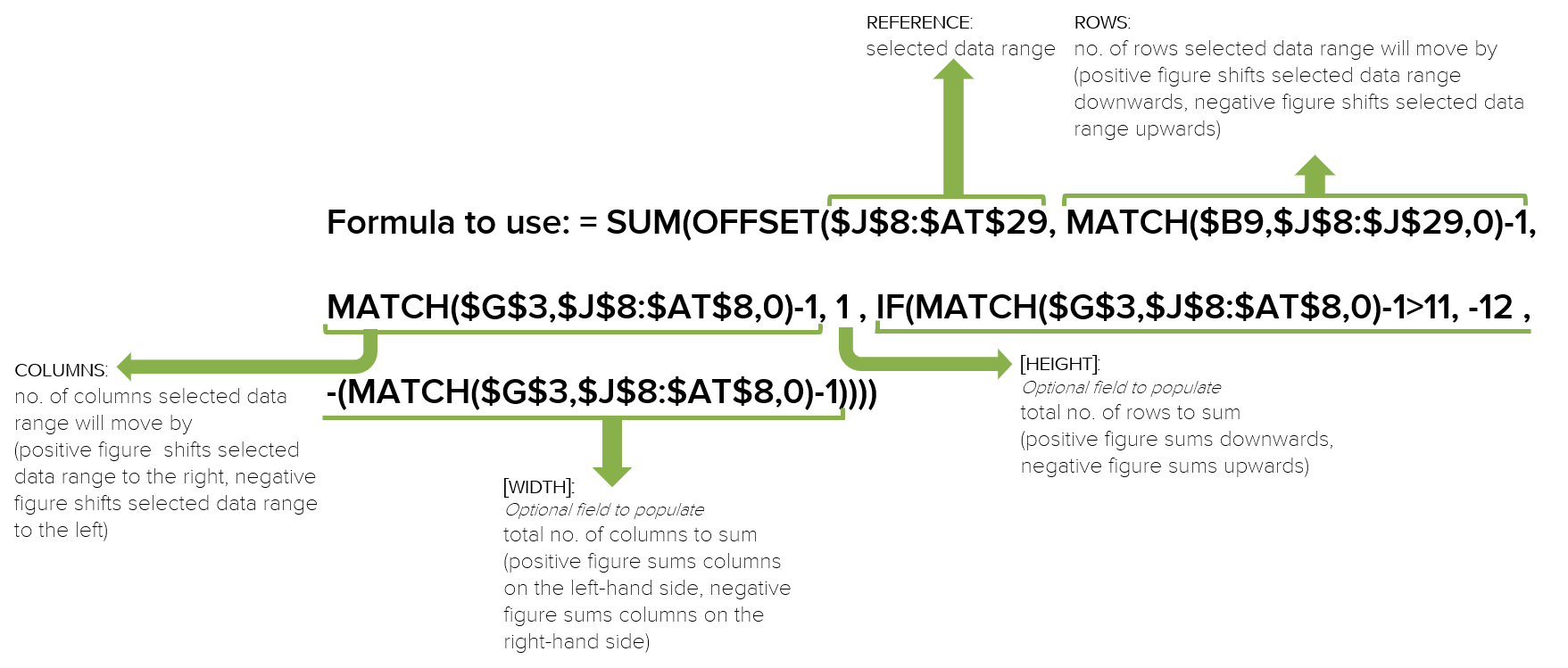
Calculate Rolling Last 12 Month Total With A Reference Date Table

La Colonne Menu D roulant Support
Opened this issue on Nov 28 2020 7 comments to join this conversation on GitHub GitHub is where people build software More than 100 million people use GitHub to discover fork and contribute to over 420 million projects

Shorthand CSS property sets an element s border It sets the values of border widthborder styleborder color This property is a shorthand for the following CSS properties property may be specified using one two or three of the values listed below The order of the values does not matter The border will be invisible if its style is not defined

In the screenshot above the borders use RGBa to be transparent but they appear solid gray because they are only revealing the solid white background of itself below Fortunately there is a CSS3 property to save us
To get it working properly in Firefox you would need transparent eee rather than transparent 000 Sorry convert your hex to decimal rgba didn t make it into the CSS3 Colors module border top 100px solid rgba 238 238 238 0 border left 100px solid eee

Courses In CSS we can create a transparent border by using the border property in a nested div tag The steps to create this are Step 1 Create a nested div tag Step 2 Specify the outer div tag s border style to be solid and the border width property can be of any desired size Step 3 The size of the inner div tag is made smaller than
The transparent border is applied using the transparent keyword and the rgba property If we take the border as transparent then the entire border will disappear and the background will display in place of the border If we take the border as rgba we can set how much background we wish to see Most of the time they are applied with images Utilities for controlling the color of an element s borders border x slate 100 border left color rgb 241 245 249 border right color rgb 241 245 249
Step by step Open PNG in Photoshop example 10x10 PNG with black circle in center Add a new layer This will be called layer 1 Ctrl Shift N Fill in with any color Alt Backspace Expand canvas to desired size The caveat is that the amount of increase on each side should be equal to the border thickness you want