Bootable Usb Windows 10 Using Cmd How To Make A Flash Drive Bootable For Windows Cmd Delinohsa Bootable Pendrive Cmd Deals Online Save 41 Jlcatj gob mx Complete Guide How To Make A Bootable USB Pendrive Windows 10 How To Create A Bootable USB In Windows 10 Using CMD In Hindi YouTube HOW TO MAKE BOOTABLE USB PEN DRIVE USING CMD COMMAND PROMPT KIGZTECH If your computer or laptop support UEFI format your USB drive using FORMAT FS FAT32 press enter key ASSIGN press enter key EXIT press enter key At this point the command prompt command line tool part is done 7 Next you need to extract all the files of the Windows 10 ISO image
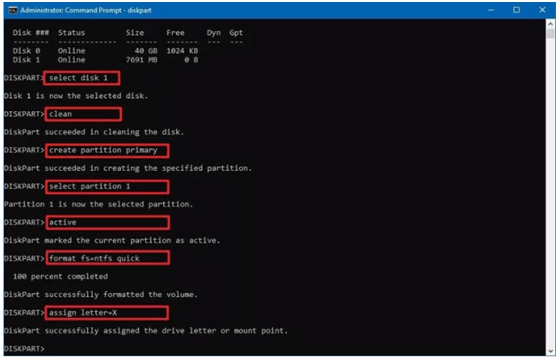
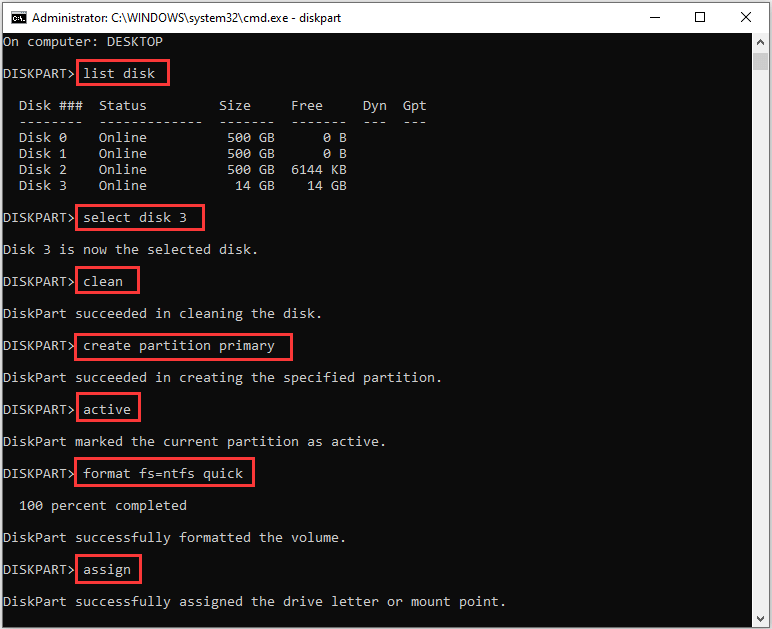
To make the Windows 10 USB bootable you need to make the partition active Do so by entering the command in the CMD Type active and press ENTER 11 Type assign and press ENTER to assign the drive to the first available drive letter The drive should now be available in Windows Explorer 12 To create installation media go to the software download website where you ll find step by step instructions On that website you can select a version of Windows and create your own installation media using either a USB flash drive or a DVD To go directly to one of the versions select one of these links Windows 10 Then select Download now
HOW TO MAKE BOOTABLE USB PEN DRIVE USING CMD COMMAND PROMPT KIGZTECH How To Create Bootable USB Windows 10 EaseUS How To Make Bootable USB Pendrive Of Windows 10 8 7 Using CMD 2020 Danois Bouche Poing How To Boot Usb Windows 10 Cest Dire Graphique Create Windows 10 Bootable Usb Using Cmd Dynamicpilot How To Create Bootable USB For All Windows Using CMD YouTube Presto Caccia Puntuale Diskpart Create Volume Membro Sindrome Rivista How To Make A Bootable Windows 10 USB On Linux Using The New WoeUSB Using Rufus To Create Bootable Usb Windows 7 Serrebe
Bootable Usb Windows 10 Using Cmd
 Bootable Usb Windows 10 Using Cmd
https://www.ubackup.com/windows-10/images/install-windows-10-from-command-prompt-6988/commands.png
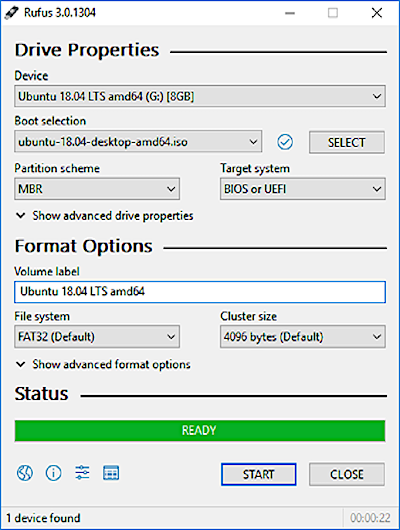
Click and Open rufus exe Once the user interface of the software opens up plug in your USB After that look for the Create a bootable USB drive option and from the dropdown select an ISO Image Then click on the button next to the dropdown and select the Windows 10 ISO that you want to install Lastly click on Start and wait
Templates are pre-designed files or files that can be used for various purposes. They can conserve effort and time by offering a ready-made format and layout for developing different kinds of material. Templates can be used for personal or professional tasks, such as resumes, invites, flyers, newsletters, reports, discussions, and more.
Bootable Usb Windows 10 Using Cmd
Create A Bootable Usb Drive Windows 10 Using Command Prompt Lasopatrax
How To Create Bootable USB Windows 10 EaseUS

How To Make Bootable USB Pendrive Of Windows 10 8 7 Using CMD 2020

Danois Bouche Poing How To Boot Usb Windows 10 Cest Dire Graphique

How To Create Bootable USB For All Windows Using CMD YouTube

Presto Caccia Puntuale Diskpart Create Volume Membro Sindrome Rivista
Insert your USB flash drive into your computer Open Start Menu and type CMD to find Command Prompt Right click on Command Prompt and click Run as Administrator Alternatively you can also open

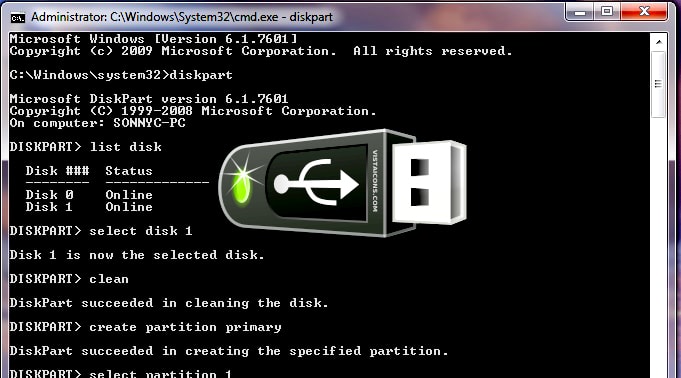
8 Once the disk is a primary partition make it an active drive Type active and hit enter on your keyboard The command will activate the flash drive 9 Now format the flash drive Type format fs fat32 quick and hit enter This command will format the flash drive in quick mode
Select the USB drive you want to use then click Next The Media Creation Tool will download Windows 10 and create a bootable USB drive The download is several gigabytes in size so it could take a while if you ve got slower internet Once it is done downloading and configuring the bootable drive click Finish

Steps to Create a Bootable Windows Linux USB Using CMD Step 1 Run the Command Prompt in Administrator mode There are two ways to do the same Search for CMD in the Start menu right click on the command prompt and click on Run as Administrator Open Task Manager go to File Run new task search for CMD and press enter
Under Device select the USB flash drive you want to format and use Under Boot selection click tap on the SELECT button and navigate to and select your 64 bit Windows 10 ISO file Under Image option if available select Standard Windows installation Under Partition scheme select MBR Press the Alt E keys
Format create a bootable USB key using the CMD prompt a iso from Windows 8 x or 10 I ve emphasised the commands by using capitals USB KEY insert the USB key Open CMD as an Admin DISKPART LIST DISK Will display the disks available SELECT DISK First off plug your USB flash drive into one of the available USB slots on your laptop and launch Run Win R and type diskpart and then hit enter CMD will open Next type list disk and hit enter to check the disk order on your system Notice on what order your USB flash drive is You can check it out by noticing the capacity
Go to the Command Prompt Select Start and type CMD in the search field right click on CMD exe and select Run as administrator Alternatively go to Start All programs Accessories right click on Command Prompt and select Run as administrator A User Account Control UAC dialog Window may appear Click Yes to Continue