Bootable Usb For Windows 10 Iso Create Bootable USB Drives From Windows With Rufus Version 3 0 How To Create A Bootable Usb For Windows 10 Iso Falasvin How To Create Bootable USB Installer For MacOS X On Windows 10 3 Easy How To Create Windows 10 Bootable USB From ISO Easy Way How To Create Bootable Usb Drive Bootable Usb Using Rufus Windows 10 1 Insert a blank USB Flash drive into your PC It needs to be at least 8GB If it s not blank note that it will be overwritten 2 Navigate to Microsoft s Download Windows 10 page 3 Click
Create an ISO file for Windows 10 Windows 10 Unlike in previous versions of Windows you ll need to use the media creation tool to create an ISO file to install Windows 10 Make sure you have a license to install Windows 10 and then follow these steps 1 Go to this page scroll down to Create Windows Installation Media and click on Download tool now 2 Once the download finishes double click the file called MediaCreationToolxxxx to run it
How To Create Bootable Usb Drive Bootable Usb Using Rufus Windows 10 How To Create A Bootable Ubuntu USB Stick In Windows Itsubuntu How To Create Bootable Usb Windows 10 With Rufus How To Make A Bootable Install Usb From Windows Iso Bang2sutara Www Ucze Wyrozumia y St umi How To Use Rufus To Create Bootable Usb Bootable Windows 10 Usb Flash Disk How To Create Windows 10 Bootable Windows 10 Bootable USB Pendrive Create Using USB Installer WillHowdy How To Make Windows 10 Bootable Usb Using Rufus Youtube Riset 12 Free Tools To Create Bootable USB Windows Linux With ISO Files
Bootable Usb For Windows 10 Iso
 Bootable Usb For Windows 10 Iso
https://2.bp.blogspot.com/-e6oOP2GZyhY/Ww6iHW52KPI/AAAAAAAAAoQ/yO26m3TsnFkfg9FD7bXAMoiuixMKpNqSQCLcBGAs/s1600/rufus-create-bootable-usb-iso-windows.png
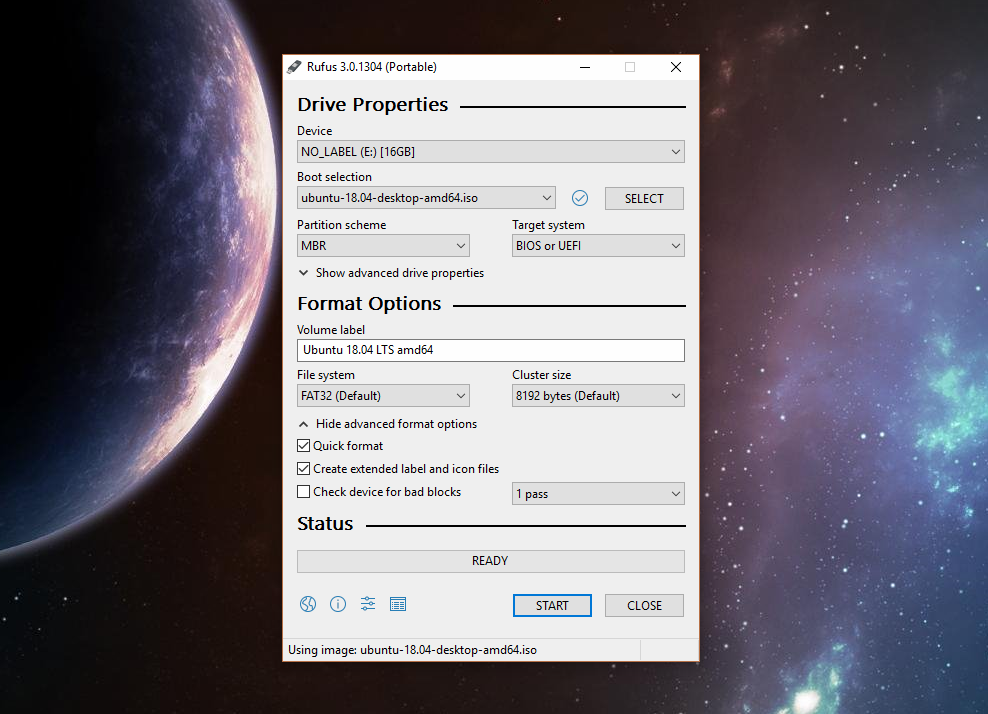
Insert a USB drive and select a device Select Disk or ISO image Locate and select ISO image to burn Under Image option choose Standard Windows installation Leave other options alone and choose Start Wait for the status to say Ready then close Rufus and remove the USB drive
Templates are pre-designed documents or files that can be used for numerous purposes. They can conserve effort and time by supplying a ready-made format and layout for creating various type of material. Templates can be used for personal or expert projects, such as resumes, invites, flyers, newsletters, reports, discussions, and more.
Bootable Usb For Windows 10 Iso
How To Make A Bootable Usb Drive Of Windows 7810 In Easiest Way

How To Create A Bootable Ubuntu USB Stick In Windows Itsubuntu
How To Create Bootable Usb Windows 10 With Rufus

How To Make A Bootable Install Usb From Windows Iso Bang2sutara Www

Bootable Windows 10 Usb Flash Disk How To Create Windows 10 Bootable

Windows 10 Bootable USB Pendrive Create Using USB Installer WillHowdy
To make a bootable Windows 10 USB drive begin by downloading the Media Creation tool from Microsoft s Download Windows 10 website Click Download Tool Now on the page Wait for the file to finish downloading in your browser Then hit Ctrl j to open your browser s downloads a menu listing your downloads should appear

To create the installation media here s what you ll need A PC with a reliable internet connection The download time will vary depending on your internet connection A USB flash drive external hard drive or DVD A blank USB flash drive or external hard drive with at least 8 GB of space or a blank DVD and DVD burner

If you want to install Windows 10 directly from the ISO file without using a DVD or flash drive you can do so by mounting the ISO file This will perform an upgrade of your current operating system to Windows 10 To mount the ISO file Go to the location where the ISO file is saved right click the ISO file and select Properties

Notes on ISO Support All versions of Rufus since v1 1 0 allow the creation of a bootable USB from an ISO image iso Creating an ISO image from a physical disc or from a set of files is very easy to do however through the use of a CD burning application such as the freely available InfraRecorder or CDBurnerXP Frequently Asked Questions FAQ

If you choose to download an ISO file so you can create a bootable file from a DVD or USB drive copy the Windows ISO file onto your drive and then run the Windows USB DVD Download Tool Then simply install Windows onto your computer directly from your USB or DVD drive When you download the ISO file you must copy it onto a USB or DVD
The Windows 10 Media Creation Tool asks you to select where you want to save the ISO file and the name you want to give it Browse your computer or device choose the location that you want choose a file name by default it is named Windows iso and then click or tap the Save button Media Creation Tool starts to download the latest Windows To create a Windows 10 USB media connect a flash drive of at least 8GB of space and then use these steps Open the Windows 10 download page Under the Create Windows 10
For full details see Windows 10 tip Create a recovery drive Open File Explorer and double click the recovery drive you just created to open its contents in a window Open a second File