Bash Replace Spaces With Underscores In Filenames Shell One Liner Replace Spaces In Filenames With Underscores Pixelated Dwarf Replace String Spaces With An Underscore Bulk Rename And Replace Spaces With Underscores In Filenames YouTube PowerShell One line Tips How To Replace Spaces In Filenames With Underscores All At Once level Handling Filenames With Spaces In Linux TecAdmin Spawn a cmd instance with extensions and delayed expansion enabled and for each exe file with spaces in name replace spaces with underscores and rename the file with the new name Share Improve this answer Follow answered Dec 26 2013 at 21 58 MC ND 69 9k 8 86 126 1
3 Answers Sorted by 2 find type f exec sed i e s g In this method we will make use of a bash script that uses the mv command to rename file and folder names in a way that all the spaces are replaced with underscores Open the Terminal application and move to the bin folder as follow cd bin Now open a new script file in one of your favorite text editors
Handling Filenames With Spaces In Linux TecAdmin How To Replace Spaces With Underscores In JavaScript LearnShareIT Replace Space With Underscore In Excel Google Sheets Auto VBA Arabic Characters Replaced With Underscores In File Name When Downloaded Spring Boot Dealing With Spaces In Filenames In Linux Jama Connect 8 79 1 Self Hosted Solved Replace Underscores With Spaces For All Files In 9to5Answer Solved Batch Rename File Names Including Spaces And 9to5Answer Solved Replace Spaces With Underscores Via BASH 9to5Answer
Bash Replace Spaces With Underscores In Filenames
 Bash Replace Spaces With Underscores In Filenames
https://pixelateddwarf.com/wp-content/uploads/2021/10/one-liners.png
The reason your script is failing with spaces is that the filename gets treated as multiple arguments when passed to mv You ll need to quote the filenames so that each filename is treated as a single agrument
Pre-crafted templates provide a time-saving option for creating a diverse variety of documents and files. These pre-designed formats and layouts can be used for various personal and professional projects, consisting of resumes, invites, flyers, newsletters, reports, presentations, and more, streamlining the content production procedure.
Bash Replace Spaces With Underscores In Filenames

Solved How To Use An Underscore In A Filename 9to5Science

How To Replace Spaces With Underscores In JavaScript LearnShareIT
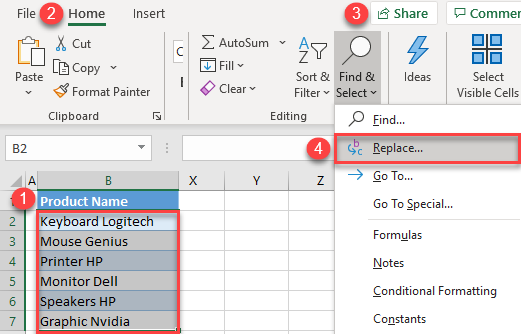
Replace Space With Underscore In Excel Google Sheets Auto VBA

Arabic Characters Replaced With Underscores In File Name When Downloaded Spring Boot

Jama Connect 8 79 1 Self Hosted

Solved Replace Underscores With Spaces For All Files In 9to5Answer

How to replace whitespace with underscore in all filenames Ask Question Asked 5 years 6 months ago Modified 5 years 6 months ago Viewed 9k times 2 The script given below places underscore instead of whitespace in all file names that are in a certain folder

The easiest way to replace white spaces with underscores in bash closed Ask Question Asked 14 years ago Modified 3 years 2 months ago Viewed 135k times 104 It s difficult to tell what is being asked here This question is ambiguous vague incomplete overly broad or rhetorical and cannot be reasonably answered in its current form

John 351 1 3 10 Underscores or dots Jeff Schaller Nov 16 2017 at 18 46 I would use rename or tr no backtick on this keyboard Joe Healey Nov 16 2017 at 18 50 2 You do know it s possible to use filenames containing spaces in the UNIX Linux world don t you Chris Davies Nov 16 2017 at 21 00 1

I have a directory with 400 sub directories each containing several hundred files many with filenames that contain spaces I need to copy all of the files with spaces in the filenames resulting two copies of those files one with spaces and one with underscores replacing the spaces
1 Overview Often as Linux users we find ourselves in a bit of trouble when some of the file commands or applications are rendered inoperative due to a space in a filename Certain file operations or practices like saving files with space in the filename can be a probable cause
5 Answers Sorted by 8 Using rename rename n s g If everything is ok remove the n switch rename s g To answer your question based on the comments on your question You need to put the dollar charachter before the curly brace character Besides that it is a good practice to quote your variables And finally to have all the spaces replaced by an underscore you need to use two slashes to be greedy on the replacement So a sample script will look like
I put this in the folder containing all the files and folders I wanted to rename named replace spaces fish Then I set it as executable using chmod x replace spaces fish and finally ran it using replace spaces fish Download my free CLI Handbook