Azure Redis Cache Delete All Keys C How To Clear Redis Cache Deleting All Keys Or From A Specific Database Azure Redis Cache Azure redis cache Jeff Ogata Cache Aside Pattern Using ASP NET Core And Azure Redis Cache How To Clear Redis Cache If you attempt to create the first Azure Cache for Redis in a subscription using PowerShell you must first register that namespace using the following command otherwise cmdlets such as code New AzRedisCache code and code Get AzRedisCache code fail p n p dir auto code Register AzResourceProvider ProviderNamespace Microsoft Cach
Copy Open Cloudshell az redis create resource group resourceGroupName name cacheName location westus2 sku Standard vm size c0 redis configuration config max memory json Configure and enable the RDB back up data persistence for new Premium Azure Cache for Redis Azure CLI Select the Networking tab or select the Networking button at the bottom of the page In the Networking tab select your connectivity method Select the Next Advanced tab or select the Next Advanced button on the bottom of the page
How To Clear Redis Cache Find And Delete Multiple Keys Matching By A Pattern In Redis The Right Way Btu Hr To Watts Converter Chart Westernmeme Azure Monitor For Azure Cache For Redis Microsoft Learn A Azure Cache For Redis Haszn lata Rusttal Microsoft Learn How To Clear Redis Cache Delete All Keys Or Specific Database Verwenden Von Azure Cache For Redis Mit Rust Microsoft Docs Quickstart Use Azure Cache For Redis In NET Framework Microsoft Learn Cache Your NET Application Data Using Azure Redis Cache CodeGuru
Azure Redis Cache Delete All Keys C
 Azure Redis Cache Delete All Keys C
https://phoenixnap.com/kb/wp-content/uploads/2021/04/how-to-clear-redis-cache-01.png
Create an Azure Cache for Redis using the Azure CLI In this scenario you learn how to create an Azure Cache for Redis You then learn to get details of an Azure Cache for Redis instance including provisioning status the hostname ports and keys for an Azure Cache for Redis instance Finally you learn to delete the cache
Pre-crafted templates offer a time-saving solution for producing a diverse variety of files and files. These pre-designed formats and designs can be made use of for numerous personal and professional tasks, including resumes, invites, flyers, newsletters, reports, discussions, and more, simplifying the material production process.
Azure Redis Cache Delete All Keys C
Azure Redis Cache CONNECT MICROSOFT ME

Find And Delete Multiple Keys Matching By A Pattern In Redis The Right Way

Btu Hr To Watts Converter Chart Westernmeme
Azure Monitor For Azure Cache For Redis Microsoft Learn

How To Clear Redis Cache Delete All Keys Or Specific Database

Verwenden Von Azure Cache For Redis Mit Rust Microsoft Docs
Next steps In this scenario you learn how to create an Azure Cache for Redis You then learn to get details of an Azure Cache for Redis instance including provisioning status the hostname ports and keys for an Azure Cache for Redis instance Finally you learn to delete the cache

Key flushing Clients can call the FLUSHDB command to remove all keys in a single database or FLUSHALL to remove all keys from all databases in a Redis cache To find out whether keys have been flushed use the INFO command The Commandstats section shows whether either FLUSH command has been called Commandstats cmdstat flushall calls 2 usec 112 usec per call 56 00 cmdstat flushdb calls 1

05 24 2022 12 contributors Feedback In this article Prerequisites To create an Azure Cache for Redis To configure the databases setting during cache creation To update an Azure Cache for Redis Show 9 more PowerShell Azure CLI Note We recommend that you use the Azure Az PowerShell module to interact with Azure

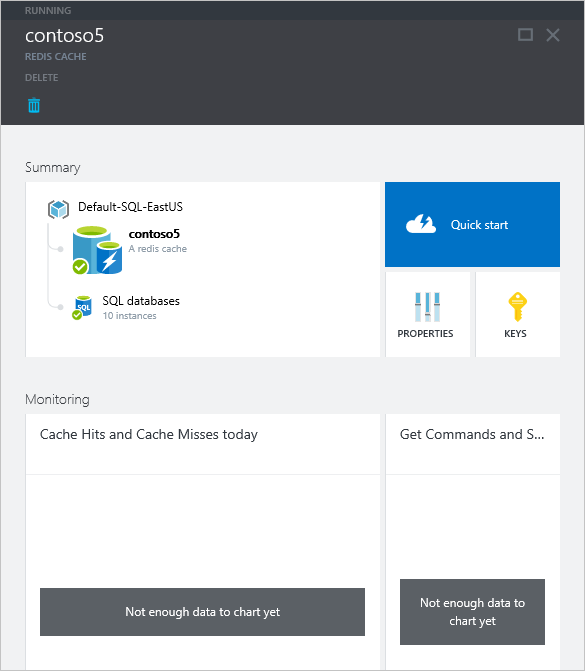
You can gather the information needed to access the cache using three methods Azure CLI using az redis list keys Azure PowerShell using Get AzRedisCacheKey Using the Azure portal In this section you retrieve the keys from the Azure portal Retrieve host name ports and access keys from the Azure portal

Due to some issue where I need to clear all the cache data on the Redis cache hosted on the Azure In other words by using the Azure portal Not by using my application One option I can think of is Delete the Redis cache instance and recreate it But do you know better way for doing that I m using StackExchange Redis dll Update 2
If so you could loop through all keys if no TTL is set then add one for key in redis keys if redis ttl key 1 redis expire key 60 60 24 7 This would clear them out in a week EDIT As kouton pointed out use scan over keys in production see a discussion on that at SCAN vs KEYS performance in Redis 2 Answers Sorted by 14 This isn t supported via the IDistributeCache interface It s designed to get set a specific key not return a range of keys If you need to do something like this you ll need to drop down into the underlying store i e Redis
Jul 9 2021 3 38 AM Hi Lodaya Monica welcome to Microsoft Q A forum Please find the answers to your queries below FLUSHALL deletes all the keys but memory used still remains same How do I release memory used by flushed purged deleted keys Response FLUSHALL will delete all the keys as well as free up the memory