Auto Resize Excel Cells Easy Excel What Is AutoFit In Excel Projectcubicle How To Auto Resize Image In Excel Cell Excel Me Excel Cell Size Resizing Height And Width Of Excel Cell Conas Gach Col n A Uathfheisti In Excel 2013 Treoir asca 4 Ch im Tutorialesdroid Maxbtoys Blog Web Mar 20 2023 nbsp 0183 32 To select all columns press Ctrl A or click the Select All button On the Home tab in the Cells group click Format gt Column Width In the Column width box type the desired number and click OK
Web Set a column to a specific width Select the column or columns that you want to change Go to Home gt Cells gt Format Under Cell Size select Column Width In the Column width box type the value that you want Select OK Web Jul 11 2023 nbsp 0183 32 The tutorial shows different ways to change row height and resize cells in Excel By default all rows on a new workbook have the same height However Microsoft Excel allows you to resize rows in different ways such as changing row height by using the mouse auto fitting rows and wrapping text
Maxbtoys Blog How To Auto Resize Image In Excel Cell Excel Me How To Insert Pictures Automatically Size To Fit Cells In Excel How To Autofit Cell In Microsoft Excel For Mac Bazarmaxb Sc na Prevencia uva ka Locked Cell Not Working In Excel Drag Wither Vraca Sa Deti How To Make Excel Table Automatically Expand How To Make Excel Cells Expand To Fit Text Automatically Earn Excel Steps Resize Array Formula Professor Excel Resize Columns And Rows In Excel Instructions And Video Lesson
Auto Resize Excel Cells
 Auto Resize Excel Cells
https://www.projectcubicle.com/wp-content/uploads/2022/09/cd2-1038x466.png
Web You can manually adjust the column width or row height or automatically resize columns and rows to fit the data Note The boundary is the line between cells columns and rows If a column is too narrow to display the data you will see in the cell
Templates are pre-designed files or files that can be used for various purposes. They can conserve time and effort by offering a ready-made format and design for producing various sort of material. Templates can be used for individual or professional projects, such as resumes, invitations, flyers, newsletters, reports, presentations, and more.
Auto Resize Excel Cells
Autofit Picture In Excel Cell

How To Auto Resize Image In Excel Cell Excel Me
How To Insert Pictures Automatically Size To Fit Cells In Excel

How To Autofit Cell In Microsoft Excel For Mac Bazarmaxb
How To Make Excel Table Automatically Expand

How To Make Excel Cells Expand To Fit Text Automatically Earn Excel
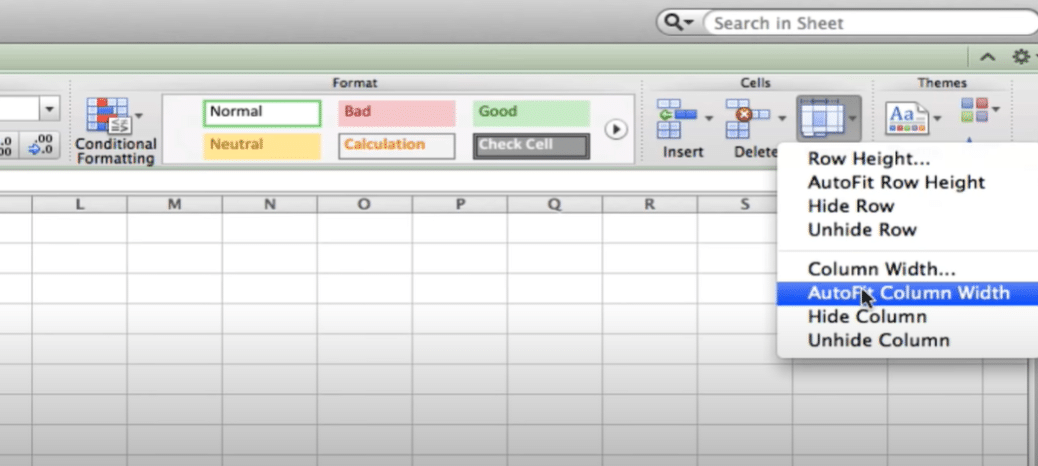
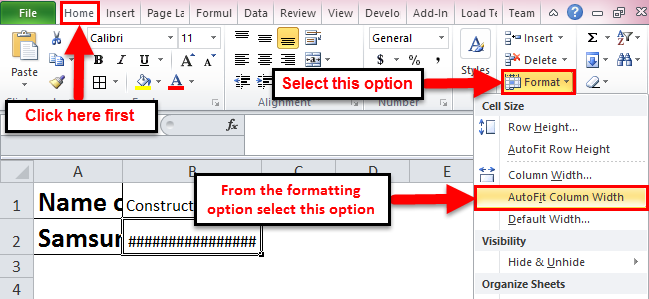
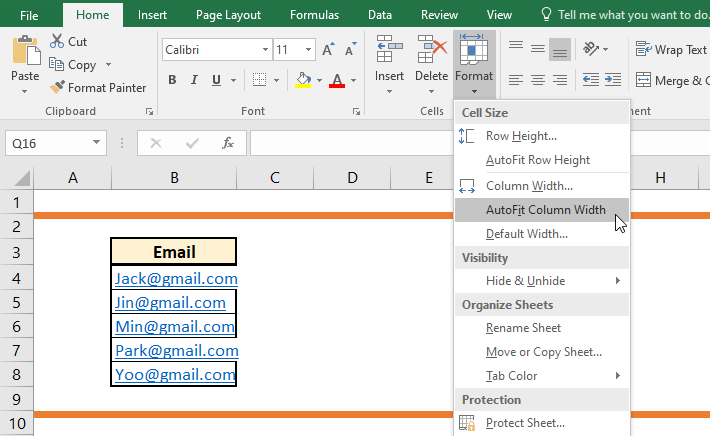
Web Below are the steps to do this Select the column you need to autofit Click the Home tab In the Cells group click on the Format option This will show additional options in the drop down Click on the Autofit Column Width option

Web Automatically resize all columns and rows to fit the data Select the Select All button at the top of the worksheet to select all columns and rows Double click a boundary All columns or rows resize to fit the data

Web As Dunc answer didn t work for me and other answers are incomplete Select cells you want to auto resize or CTRL a for all cells Menu Home tab gt Format gt Column gt AutoFit Row Column Height
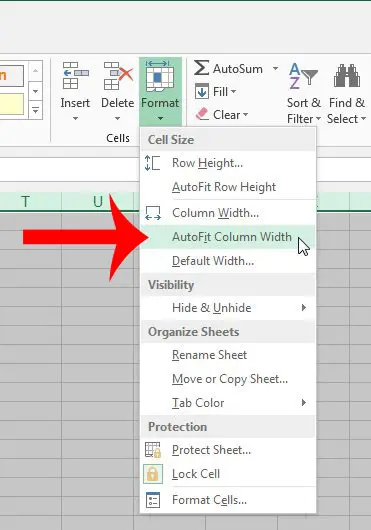
Web Nov 12 2021 nbsp 0183 32 Automatically Resize Cells Using AutoFit Microsoft Excel provides a feature called AutoFit that you can use to format cells in both columns and rows We ll show you how this works using an example Here you can see our data is squished and unreadable for both our column headers and dollar amounts So we ll expand the cells

Web Mar 3 2022 nbsp 0183 32 Quick Links Use AutoFit for Specific Columns or Rows in Excel Use AutoFit for an Entire Worksheet in Excel Using Microsoft Excel s AutoFit feature you can ensure that your content in your cells is always fully visible without being cut off Here s how to use this option for specific rows and columns and for your entire worksheets
[desc-11] [desc-12]
[desc-13]