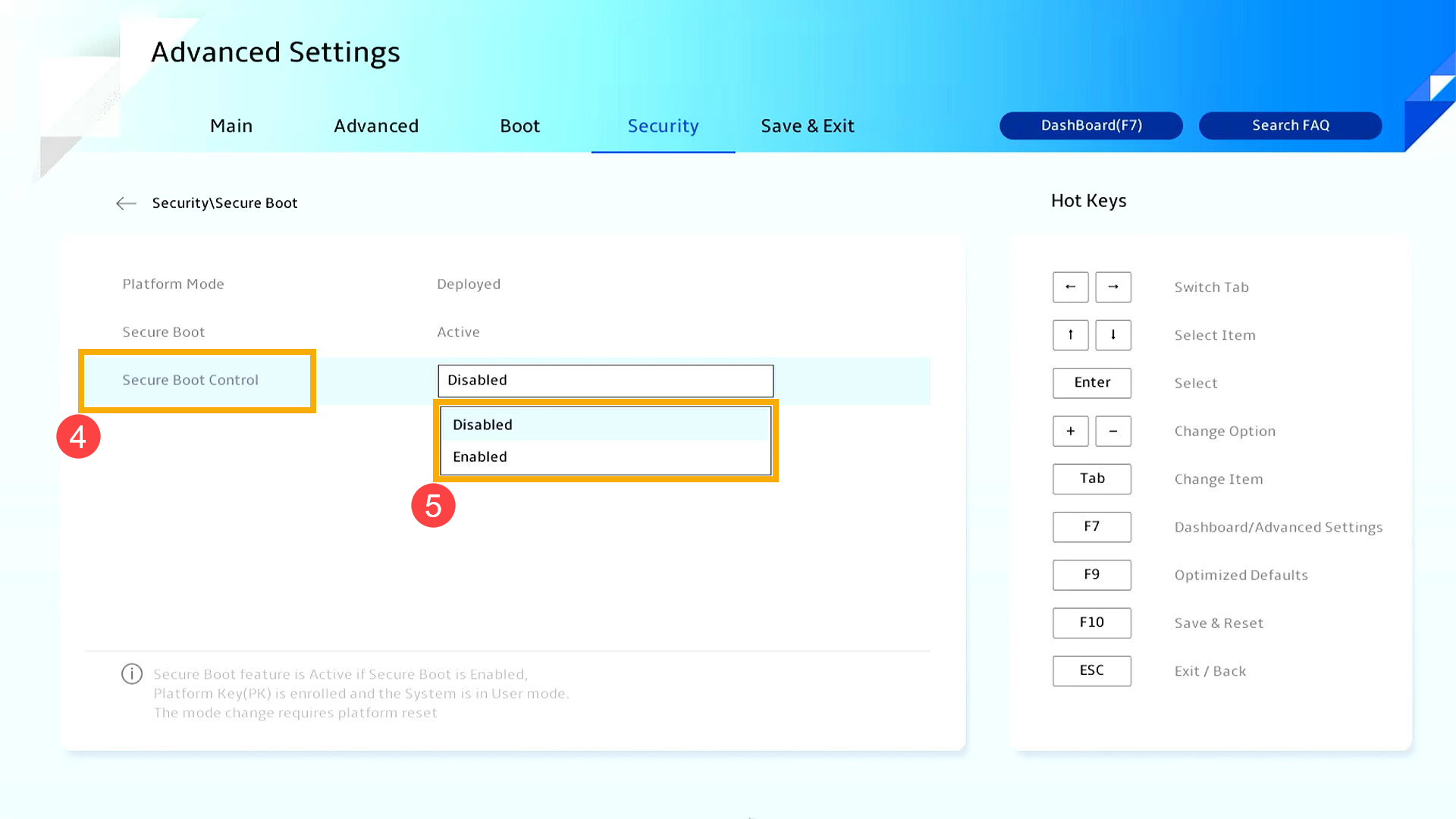
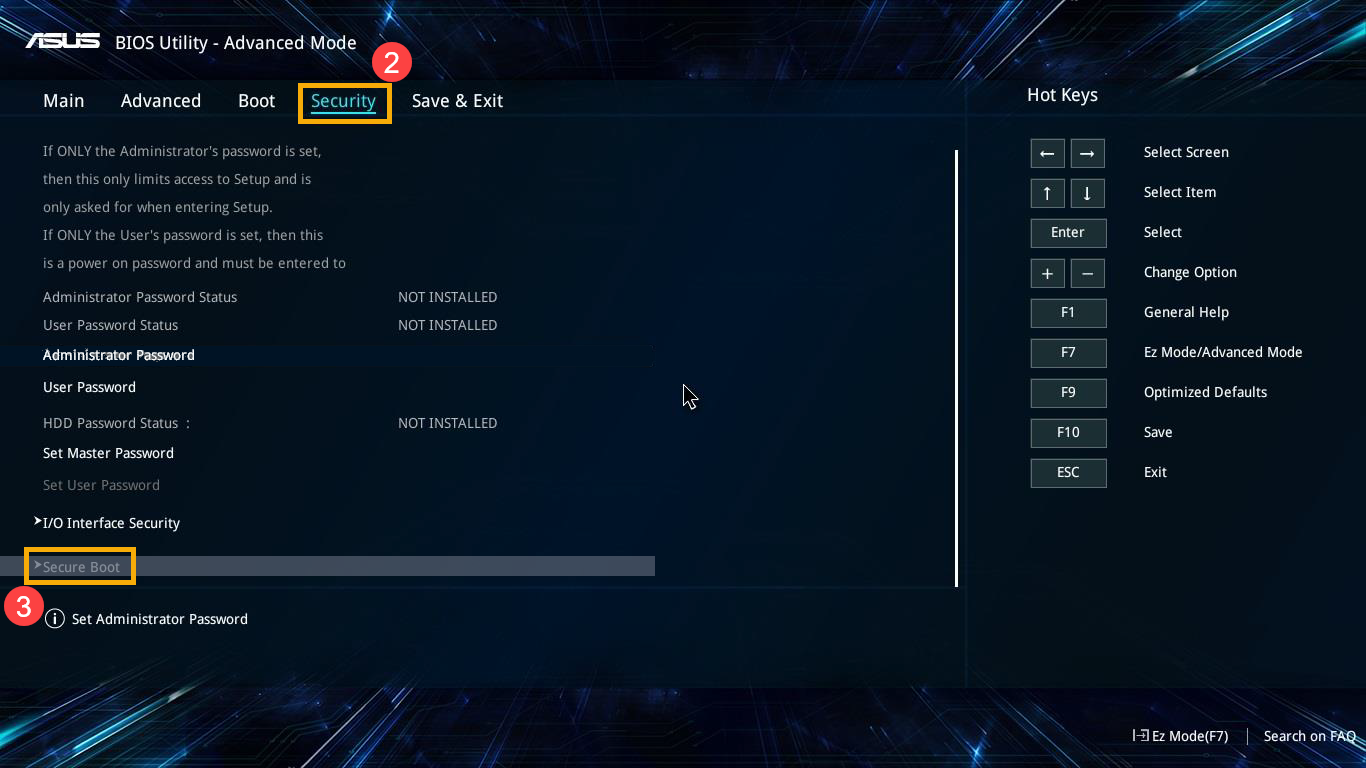
Asus Secure Boot Keys Valorant Secure Boot Asemortgage How Can I Enable This Secure Boot Its Block Me To Play Valorant Please Contaminar Fracaso Guarda La Ropa Uefi Bios Disable Secure Boot Asus Bios Windows 11 Secure Boot Robyn Underwood Hot Sex Picture How To Disable Secure Boot Web Jul 14 2023 nbsp 0183 32 Watch on UEFI mode You also can select items by using Keyboard Touchpad or Mouse After entering the BIOS configuration go to the Advanced Mode by using Hot Key F7 or cursor Select Security screen then select Secure Boot item To disable the Secure Boot Select Secure Boot Control item then select
Web Jul 29 2022 nbsp 0183 32 How do I turn secure boot off in UEFI BIOS on an ASUS TUF Gaming board Ask Question Asked 1 year 6 months ago Modified 1 month ago Viewed 58k times 5 I ve tried following various tutorials Web Aug 2 2022 nbsp 0183 32 Is it normal for Asus motherboards to have some hashes in the secure boot key DB If so to what would they possibly pertain I m wondering if it would be for EFI firmware on devices such as GPU individual drives etc
How To Disable Secure Boot Comment Activer TPM 2 0 Et Secure Boot Pour Mettre Jour Vers Windows 11 Notebook e en Probl mu V BIOSu Se Objev Chybov Zpr va Secure How To Boot And Install Linux On UEFI PC With Secure Boot Tip DotTech How To Install Custom Secure Boot Keys Securing Windows 10 With Secure Boot And TPM Get Ready For Windows 11 What You Need To Know About Windows 10 Secure Boot Keys How To Enable Secure Boot For Windows 11 Addictivetips 2022 Www vrogue co Sharply Feeling Drink Water Asus Bios For Windows 11 Video Zoo Blossom
Asus Secure Boot Keys
 Asus Secure Boot Keys
https://i.redd.it/r5rf01w1ivo71.jpg
Web Jan 19 2024 nbsp 0183 32 Here is the tutorial on how to use a USB drive to make a MiniTool bootable media Step 1 Connect a USB drive to a normal running computer Then click the above button to buy MiniTool Partition Wizard Step 2 Launch this software and go to its main interface Then click Bootable Media at the upper right corner
Pre-crafted templates provide a time-saving option for developing a varied variety of files and files. These pre-designed formats and layouts can be utilized for different personal and expert jobs, consisting of resumes, invitations, leaflets, newsletters, reports, discussions, and more, simplifying the material creation procedure.
Asus Secure Boot Keys
Notebook AIO How To Enable disable Secure Boot Official Support

Comment Activer TPM 2 0 Et Secure Boot Pour Mettre Jour Vers Windows 11
Notebook e en Probl mu V BIOSu Se Objev Chybov Zpr va Secure

How To Boot And Install Linux On UEFI PC With Secure Boot Tip DotTech

Securing Windows 10 With Secure Boot And TPM Get Ready For Windows 11

What You Need To Know About Windows 10 Secure Boot Keys

Web Sep 21 2022 nbsp 0183 32 Go to Security gt Secure Boot Select Secure Boot Control and set it to Disabled If the option doesn t exist go to Boot gt Secure Boot Pick OS Type and set it to Other OS Press F10 and select Yes to save and exit You can also disable Secure Boot by deleting the platform key

Web May 25 2023 nbsp 0183 32 If you would like to enable or disable Secure Boot please follow the steps below First enter the computer s BIOS utility With the computer powered off press and hold the F2 button of the keyboard and then press the Power button to enter the BIOS utility

Web Sep 7 2021 nbsp 0183 32 Shishir Secure Boot is often enabled by default on ASUS motherboards with UEFI BIOS I wanted to have a dual boot setup on my new PC and that is not possible when secure boot is enabled That meant having to identify the Asus BIOS key for the motherboard enter the Asus BIOS utility and disable secure boot on my Windows 10

Web May 18 2022 nbsp 0183 32 This document helps guide OEMs and ODMs in creation and management of the Secure Boot keys and certificates in a manufacturing environment It addresses questions related to creation storage and retrieval of Platform Keys PKs secure firmware update keys and third party Key Exchange Keys KEKs

Web Sep 12 2022 nbsp 0183 32 Usually you need to press the Esc Delete or one of the Function keys F1 F2 F10 etc Open the boot or security settings page as needed Select the Secure Boot option and press Enter
[desc-11] [desc-12]
[desc-13]