Arduino Attachinterrupt Example Arduino Interrupts Using AttachInterrupt Tutorial NerdyTechy Arduino Inputs And Interrupts YouTube Arduino Interrupts Tutorial The Robotics Back End Arduino Interrupts Using AttachInterrupt Tutorial NerdyTechy Arduino Interrupts Tutorial With Example Interrupt Demonstration Feb 21 2023 nbsp 0183 32 Try disconnecting and reconnecting the USB cable Failing that before you upload hold down both the BOOT and EN buttons
Dec 9 2023 nbsp 0183 32 The Library pins arduino h defines the pin in a strange way so the default sketch simply doesnt work because the value of RGB BUILTIN is wrong for this board define PIN NEOPIXEL 48 static const uint8 t LED BUILTIN SOC GPIO PIN COUNT PIN NEOPIXEL define RGB BUILTIN LED BUILTIN May 16 2023 nbsp 0183 32 Hi guys I am new to Arduino and don t know a lot of things about Arduino and how thing should or shouldn t go so I am sorry D For context I am trying to do this project to graduate on high school I ve been having some problems since I started The last one was with Serial Monitor where should have been written text but nothing was there My classmate who knows
Arduino Interrupts Tutorial With Example Interrupt Demonstration Arduino 3 5 vLcds GPU Arduino I2C Interrupts In Arduino Buy Arduino Programming Step by step Guide Room Temperature Monitor Getting Started With Arduino And Genuino UNO ARDUINO DAN VB NET Arduino Project Hub How To Use Arduino Interrupts Explained With Examples Code Arduino Homemade Shocking Electric Game Lie Detector Buy Seeed StudioGrove Beginner Kit Arduino Starter Kit All in One
Arduino Attachinterrupt Example
 Arduino Attachinterrupt Example
https://nerdytechy.com/wp-content/uploads/2021/04/arduino-interrupts-using-attachinterrupt-thumb-1400x733.png
May 6 2024 nbsp 0183 32 The version is shown on the window title bar and also in the dialog that opens when you select Help gt About or Arduino IDE gt About Arduino IDE for macOS users from the Arduino IDE menus I ask for this information because I want to give you the appropriate instructions for the IDE version you are using
Pre-crafted templates use a time-saving option for developing a varied range of documents and files. These pre-designed formats and layouts can be made use of for numerous personal and professional projects, consisting of resumes, invitations, leaflets, newsletters, reports, presentations, and more, enhancing the material production procedure.
Arduino Attachinterrupt Example

Getting Multiple Runs Of Interrupt Programming Questions Arduino Forum

Arduino 3 5 vLcds GPU Arduino I2C
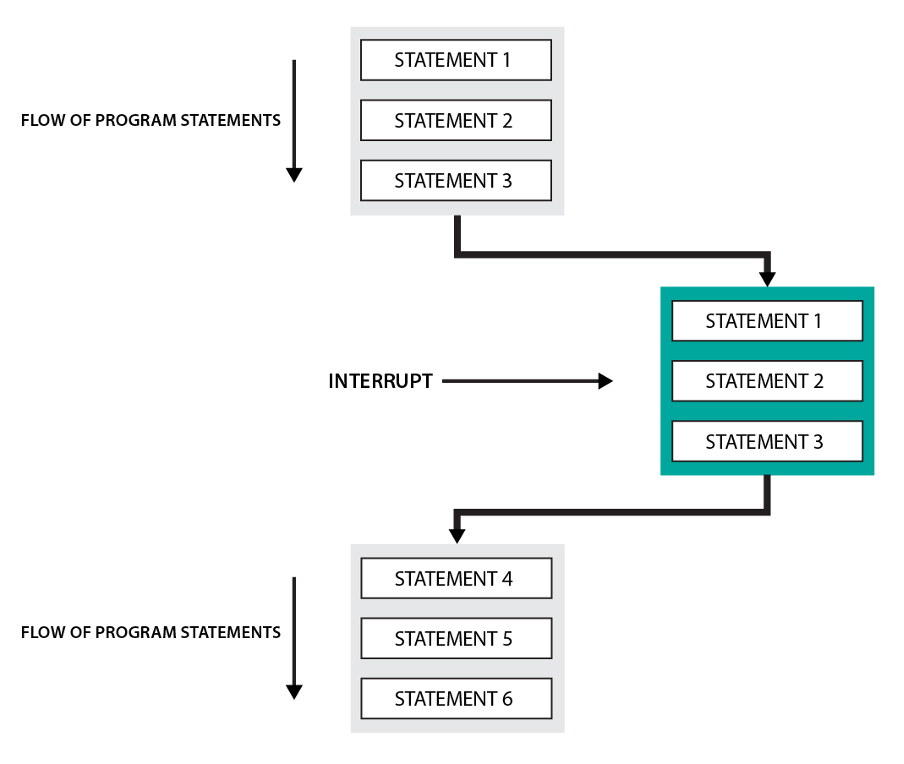
Interrupts In Arduino

Buy Arduino Programming Step by step Guide Room Temperature Monitor
Arduino Project Hub
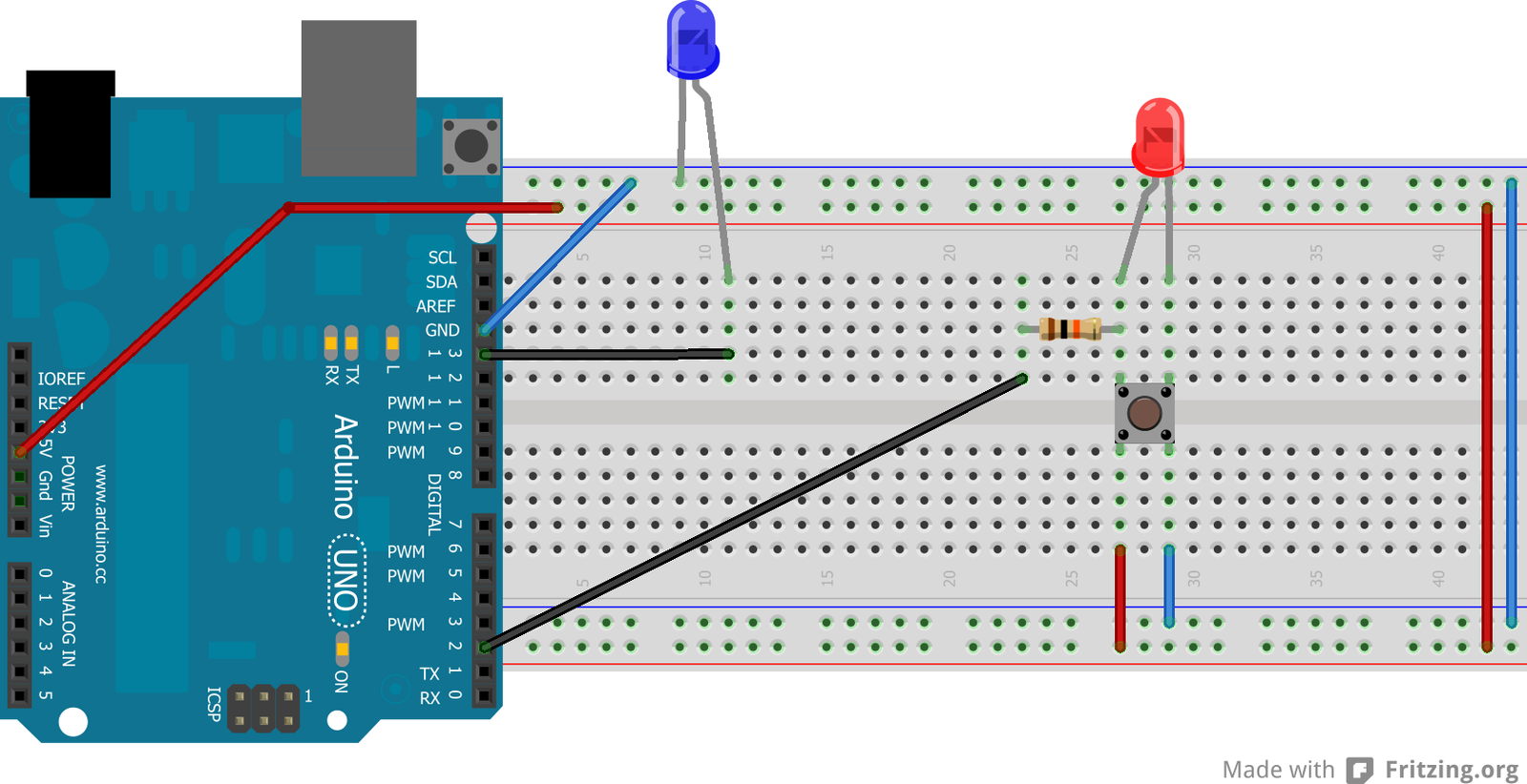
How To Use Arduino Interrupts Explained With Examples

Dec 5 2024 nbsp 0183 32 arduino arduino ide 2571 arduino arduino cli 2707 arduino arduino cli 2665 arduino pluggable discovery protocol handler 50 Previously Arduino IDE would sometimes hang on startup if the user had previously installed earlephilhower s excellent quot Raspberry Pi Pico RP2040 quot boards platform Compatibility with that platform has now been restored

Nov 19 2024 nbsp 0183 32 Arduino IDE periodically deletes contents of this folder the files stored under it are only cached there for the sake of efficiency and it can always regenerate the files on demand so you should not use this folder to store any valuable files

Sep 16 2024 nbsp 0183 32 Im using arduino IDE 2 3 2 with esp32 wrrom kit and Im trying to generate a simple pwm example and Im getting this error Compilation error amp 39 ledcSetup amp 39 was not declared in this scope The esp32 library is the 3 0 4

Oct 2 2017 nbsp 0183 32 Part 1 It is not usually long before new Arduino users discover that although the delay function is easy to use it has side effects the main one of which is that its stops all activity on the Arduino until the delay is finished not quite true I know but that is usually how the problem presents itself When this occurs the new user is usually directed to the
Jul 24 2024 nbsp 0183 32 GitHub arduino arduino ide Arduino IDE 2 x click Releases at the right hand side This will take you to the page where you can find all releases Releases 183 arduino arduino ide 183 GitHub Click Assets under 2 2 1 and you can download what you need
[desc-11] [desc-12]
[desc-13]