Apt Get Install Maven Version Comment Installer Le Package Apt show versions Sur Ubuntu StackLima Solve Ubuntu Unmet Dependencies Problem Try Apt Get Install YouTube How To Install Maven Windows 10 Falasphotography 20 Maven Commands And Options Cheat Sheet DigitalOcean Maven And IntelliJ IDEA DevsDay ru Apt cache s madison command attempts to mimic the output format and a subset of the functionality of the Debian archive management tool madison It displays available versions of
Aug 27 2010 nbsp 0183 32 apt get has a few options which looks the same to me autoclean autoremove and clean What do each of them do Apt will attempt to correct broken dependencies If you manually installed a package that had unmet dependencies apt get will install those dependencies if possible otherwise it may
Maven And IntelliJ IDEA DevsDay ru Apt get Update Vs Apt get Upgrade Ubuntu Maven apt get Komenda Linux Apt Yum RPM Pacman ITTalk pl UML Javadoc Maven umlgraph Mac For Maven Linux Apt get 51CTO apt get Install Instalar Maven En WSL2 Ubuntu BytesX Blog Instalaci n Software En MiniPC M s Potencia Para Tu Dom tica
Apt Get Install Maven Version
 Apt Get Install Maven Version
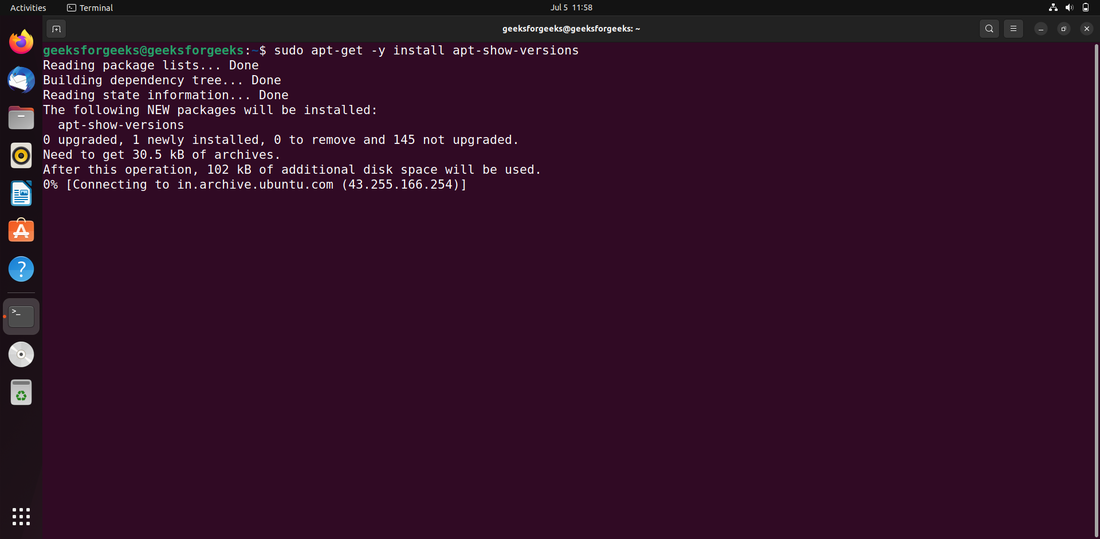
https://media.geeksforgeeks.org/wp-content/uploads/20220705122208/31.png
I have successfully installed some packages using the command sudo apt get install packagename when I have known in advance that those packages are available But how can I
Pre-crafted templates offer a time-saving option for developing a diverse range of documents and files. These pre-designed formats and layouts can be used for numerous personal and professional tasks, including resumes, invitations, flyers, newsletters, reports, presentations, and more, enhancing the content creation process.
Apt Get Install Maven Version
How To Install SonarQube On Ubuntu Codingtricks Technology For Innovators
Apt get Update Vs Apt get Upgrade

Ubuntu Maven apt get

Komenda Linux Apt Yum RPM Pacman ITTalk pl

Mac For Maven

Linux Apt get 51CTO apt get Install
The graphical utility update manager does not use apt get directly instead it works with a backend called aptdaemon The standard abilities of update manager are a mix of the upgrade
The apt commands have been introduced to solve this problem apt consists some of the most widely used features from apt get apt cache and apt config leaving aside obscure and seldom

Otherwise it can be dealt via CLI Open terminal and run this command sudo apt get clean Above command will clean out the local repository of retrieved package file sudo apt get install f Will

Ubuntu apt apt get apt apt get Linux
May 11 2023 nbsp 0183 32 Lots of built in system scripts use the following quot shebang quot to indicate what binary should run the script This is expected to be a link to the system default version of Python
[desc-11] [desc-12]
[desc-13]