Alt Not Working In Excel Mac F4 Not Working In Excel AuditExcel co za SOLVED Keyboard Not Working In Excel 2023 4 Quick Fixes For Sims 4 Alt Key Not Working West Games How To Fix Filter Not Working In Excel 3 Cases MiniTool Partition Wizard Alt Not Working In Excel 2010 On My HP Laptop 4 Solutions YouTube Alt 0228 228 alt 0229 229 alt 0230 230 alt 0231 231 alt 0232 232 alt 0233 233 alt 0234 234 alt 0235 235 alt 0236 236 alt 0237 237 alt 0238 238 alt 0239 239 alt 0240 240 alt 0241 241 alt 0242 242 alt 0243 243
How to type ALT code symbols Press the ALT key and type the ALT code with the keyboard s numeric keypad Example ALT 65 will write the capital A letter Oct 10 2025 nbsp 0183 32 Learn how to type special symbols and letters using Alt codes Complete listings and tables for Windows
Alt Not Working In Excel 2010 On My HP Laptop 4 Solutions YouTube 7 Reasons Why VLOOKUP Not Working In Excel Super Nice Drop Concatenate Not Working In Excel 3 Reasons With Solutions ExcelDemy Excel Scroll Lock Stuck Maxblee 13 Best Ways To Fix Alt Key Not Working On Keyboard How To Type Anything How To Fix Arrow Keys Not Working In Excel Alt Tab To Desktop Windows 10 Up And Down Arrows Not Working In Excel Lokasintreasure
Alt Not Working In Excel Mac
 Alt Not Working In Excel Mac
https://www.auditexcel.co.za/wp-content/uploads/2022/07/F4-not-working-in-Excel-2.png
Jun 30 2025 nbsp 0183 32 Discover the most complete list of ALT codes for typing symbols and special characters in Windows Learn how to use them easily
Pre-crafted templates use a time-saving solution for producing a varied series of documents and files. These pre-designed formats and layouts can be used for different personal and professional jobs, including resumes, invitations, leaflets, newsletters, reports, discussions, and more, enhancing the content development procedure.
Alt Not Working In Excel Mac

SOLVED Arrow Keys Not Working In Excel 2022
7 Reasons Why VLOOKUP Not Working In Excel
Super Nice Drop
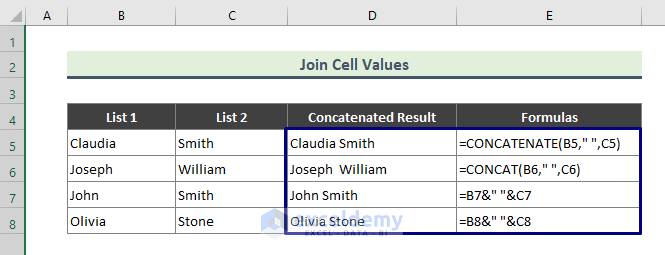
Concatenate Not Working In Excel 3 Reasons With Solutions ExcelDemy

13 Best Ways To Fix Alt Key Not Working On Keyboard How To Type Anything
How To Fix Arrow Keys Not Working In Excel

On personal computers with numeric keypads that use Microsoft operating systems such as Windows many characters that do not have a dedicated key combination on the keyboard may nevertheless be

Alt codes in blue are for non printable and non displayable control characters You can tap or click any character listed below to copy it to your clipboard and then paste it into your document

Sep 7 2025 nbsp 0183 32 Highlighting text in Microsoft Word and then pressing Alt opens the equation feature for inserting mathematical equations in to a document Microsoft Word keyboard shortcuts
Reference sheet of the all alt key codes for special characters and symbols with instructions for entering through Alt on Windows Complete list of alt codes

Alt codes are a simple way to enter special characters and symbols on Windows computers using the numeric keypad such as accented characters punctuation marks and other symbols
[desc-11] [desc-12]
[desc-13]