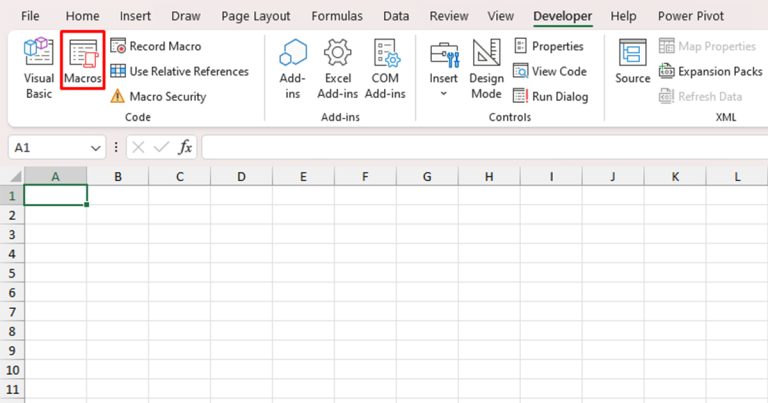
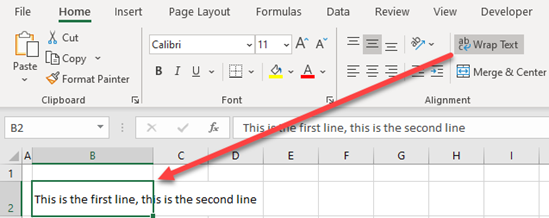
Alt Enter Not Working Windows 10 Visual Studio Code Emmet exclamation Enter Not Working After Jun 2022 Release YouTube How To Go Down A Line In Excel Rodriguez Twild1973 Emmet HTML Not Working ENTER Not Working Visual Studio Code YouTube OnTrigger Enter Not Working Tried Everything Unity Answers Windows 10 Alt Tab Not Working Since Update Sampledelta Web Answer For the cell which you want to use the Alt Enter function please make sure Wrap Text is enabled for that cell If the issue persists with a cell which Wrap Text is enabled you may try online repairing the Office suite
Web Mar 5 2021 nbsp 0183 32 This solution to fix ALT codes not working on Windows 10 is enabling entry of all Unicode characters via Regedit Here are the steps Step 1 Press the Windows key R key at the same time to open the Run dialog box and type regedit and press Enter to open Registry Editor Web Mar 10 2023 nbsp 0183 32 Special Char registry is corrupted In rare situations this problem can also be caused by inconsistency with the registry that keeps track of all ALT characters If this scenario is applicable you should be able to circumvent the problem by using the Character Map to add special characters
Windows 10 Alt Tab Not Working Since Update Sampledelta ALT ENTER Not Working In Excel How To Fix It ALT ENTER Not Working In Excel How To Fix It For Some Reason The Game Looks Like This It Is Fullscreen RDR2 Enter Not Working Ask GameDev tv Windows 10 Alt Tab Not Working Or Start Menu Plantsenturin ALT ENTER Not Working In Excel How To Fix It How To Solve Enter Key Not Working Problem In Windows Auslogics Blog Alt Tab Not Working On Windows 10 SOLVED
Alt Enter Not Working Windows 10
 Alt Enter Not Working Windows 10
https://i.ytimg.com/vi/4Dfra3FXDNM/maxresdefault.jpg
Web Dec 9 2019 nbsp 0183 32 This also worked a long time on Windows 10 but since a few days after the 1903 update it is no longer functional Now I have to use Alt Enter Alt Return in order to get the window How do I enable Alt 1 again
Pre-crafted templates offer a time-saving option for creating a varied range of files and files. These pre-designed formats and designs can be used for numerous personal and expert jobs, including resumes, invites, leaflets, newsletters, reports, presentations, and more, streamlining the content development process.
Alt Enter Not Working Windows 10

ALT ENTER Not Working In Excel How To Fix It
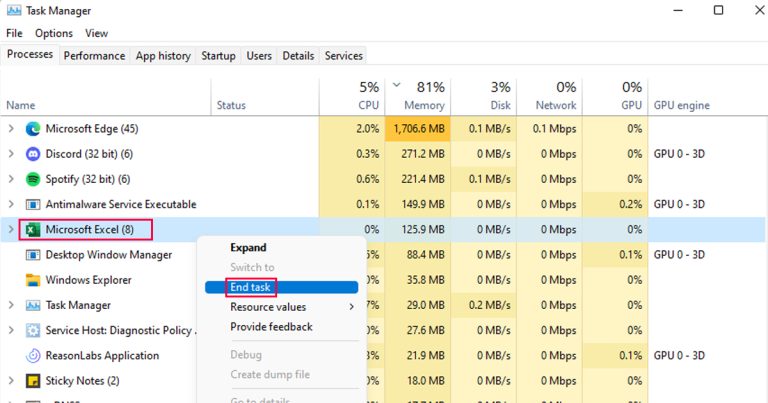
ALT ENTER Not Working In Excel How To Fix It

ALT ENTER Not Working In Excel How To Fix It

For Some Reason The Game Looks Like This It Is Fullscreen RDR2
Windows 10 Alt Tab Not Working Or Start Menu Plantsenturin
ALT ENTER Not Working In Excel How To Fix It
Web Dec 2 2020 nbsp 0183 32 Alt Enter is not working I m using microsoft excel 2016 in windows 10 Alt Enter is not working I want to move to next line in the same cell but when i press Alt enter nothing was happen This thread is locked
Web Jan 9 2023 nbsp 0183 32 If you need to use ALT codes on Windows but find that they are not working you might want to enable Mouse Keys when NUM LOCK is ON This is an easy fix for many ALT code problems The method involves pressing the left ALT left SHIFT NUM LOCK keys simultaneously on your keyboard
Web Dec 12 2019 nbsp 0183 32 Less than 2 weeks ago i bought a new PC with Windows 10 already installed And to my surprise i can t use this shortcut anymore I tried to find the answer on the internet and found that quot alt enter quot now serves another useless for me function quot Display properties for the selected item quot

Web Mar 13 2017 nbsp 0183 32 In the meantime we recommend that you check if Sticky Keys is turned on in the Accessibility settings Sticky Keys lets you press one key at a time for keyboard shortcuts To check refer to the steps below Click on

Web Aug 2 2020 nbsp 0183 32 If the Ctrl Alt and Enter keys are working normally in other situations ruling out keyboard malfunction you might have software running in the background that hijacks those key combinations Do Windows key Ctrl Enter and Windows key Alt Enter work instead of Ctrl Enter and Alt Enter
Web Jul 27 2017 nbsp 0183 32 hi in my case it is always quot lost key stroke quot on some remote computer Remote desktop VM ware etc it happens that your key stroke does not correctly reach the remote computer and the my computer is confused Web If the keys themselves are not responding you may need to replace your keyboard How to Fix If your keyboard has two Alt keys try using Alt Enter with the other one If it works the first Alt key is damaged and needs repair You can use the Alt Enter shortcut in other applications like Google Sheets to see if it works outside of Excel
Web Sep 28 2018 nbsp 0183 32 The inconvenience that you have related to your keyboard lies in the driver of the same because it is likely to be installed incorrectly this obsolete or not compatible with Windows 10 To solve this problem manually reinstalls the driver displaying How to update a hardware driver that it does not work