Alt Code For Bullet Point In Excel Bullet Point Symbol Images Draw jelly How To Insert Bullet Points In Excel Top 8 Ways For Lists Windows Mac Bullet Point Alt Code How To Type On Any Keyboard How To Type Dot Symbol Bullet Point In HTML Unicode Bullet Point ALT Code 2020 Comprehensive Guide Web Here are the steps to add bullet points to cells in your worksheet using a custom number format Select the cell s where you want to add bullet points Right click on your selection and click on Format Cells from the context menu that appears Alternatively you could simply use the shortcut CTRL 1
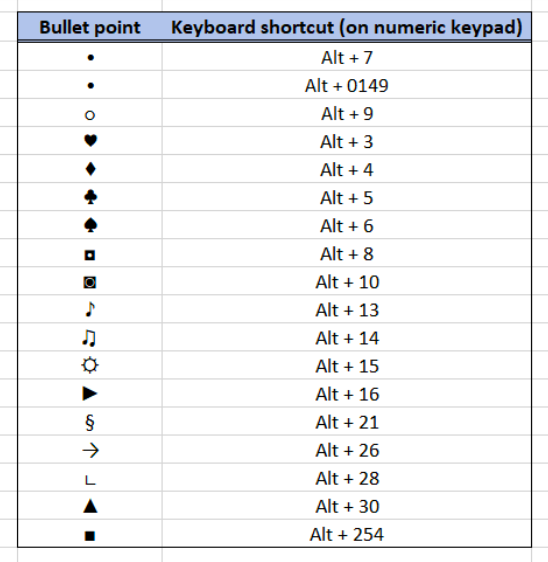
Web Bullet Symbols Here you can find the list of bullet symbols alt codes and unicode symbols To make a bullet symbol or a circle symbol text you can copy and paste bullet point symbol from the table below What is Bullet Bullet is a small symbol used to introduce an item of a list How to use Web Oct 28 2019 nbsp 0183 32 Alt Code You can insert a bullet point in Excel using your keyboard only All you need to do is to hold down the Alt button while typing in the corresponding code for the character While holding the Alt key press 7 to add a bullet point Use Alt 9 to place a hollow circle Symbols
Bullet Point ALT Code 2020 Comprehensive Guide Bullet Point Symbols Bullet Symbol Alt Codes What Is The Keyboard Shortcut For Bullet Points On A Mac Serreidaho Bullet Point Symbol Images Draw jelly Keyboard Shortcut Bullet Point Chrome Dameraf Custom Bullet Points CSS Replacing Default Bullets With Unicode How To Make A Bullet Point In Excel Schneider Butrarstabor Pin On DeSign Knowledge How To Type A Bullet Point An Easy Ways May Help AmazeInvent
Alt Code For Bullet Point In Excel
 Alt Code For Bullet Point In Excel
https://img.favpng.com/25/0/17/bullet-character-symbol-computer-icons-alt-code-png-favpng-km4wnspfGTc4tX88Uv8aDrCEN.jpg
Web Apr 10 2023 nbsp 0183 32 Alt Key Decimal Alt X Hex Code Triangular Bullet Alt 8227 2023 Delta Or Increment Alt 8710 2206 Normal Subgroup Of Alt 8882 22B2 Contains As Normal Subgroup Alt 8883 22B3 Right Triangle Alt 8895 22BF Bowtie Alt 8904 22C8 Left Normal Factor Semidirect Product Alt 8905
Templates are pre-designed files or files that can be utilized for numerous functions. They can conserve effort and time by providing a ready-made format and design for creating different type of material. Templates can be used for individual or expert tasks, such as resumes, invitations, flyers, newsletters, reports, presentations, and more.
Alt Code For Bullet Point In Excel
Bullet Point Symbol Images Draw jelly

Bullet Point Symbols Bullet Symbol Alt Codes
What Is The Keyboard Shortcut For Bullet Points On A Mac Serreidaho
Bullet Point Symbol Images Draw jelly
Custom Bullet Points CSS Replacing Default Bullets With Unicode

How To Make A Bullet Point In Excel Schneider Butrarstabor
Web For the the complete list of the first 256 Windows ALT Codes visit Windows ALT Codes for Special Characters amp Symbols Learn easy ALT code keyboard shortcuts for bullet point symbols like Bullet and Circled Bullet Or click any bullet symbol to copy and paste

Web If you have a numeric keypad on your keyboard Select the cell in which you want to insert the bullet Either double click on the cell or press F2 to get into edit mode Hold the ALT key press 7 or 9 leave the ALT key As soon as you leave the

Web Nov 30 2015 nbsp 0183 32 With Number Lock off in Excel ALT 0149 does not produce anything However other combinations of numbers do For example with Number Lock off ALT 77 gives M In PPT with the number lock off certain ALT codes work ALT 77 gives an M but others such as ALT 014 rotates a text box

Web May 27 2021 nbsp 0183 32 Make sure that numlock is on then press and hold the ALT key While keeping the ALT key held down type in a code for whichever symbol you want which will then appear anywhere that you can now paste text into You can t type Unicodes but other codes can be used within an HTML or Java programming language How to Insert a

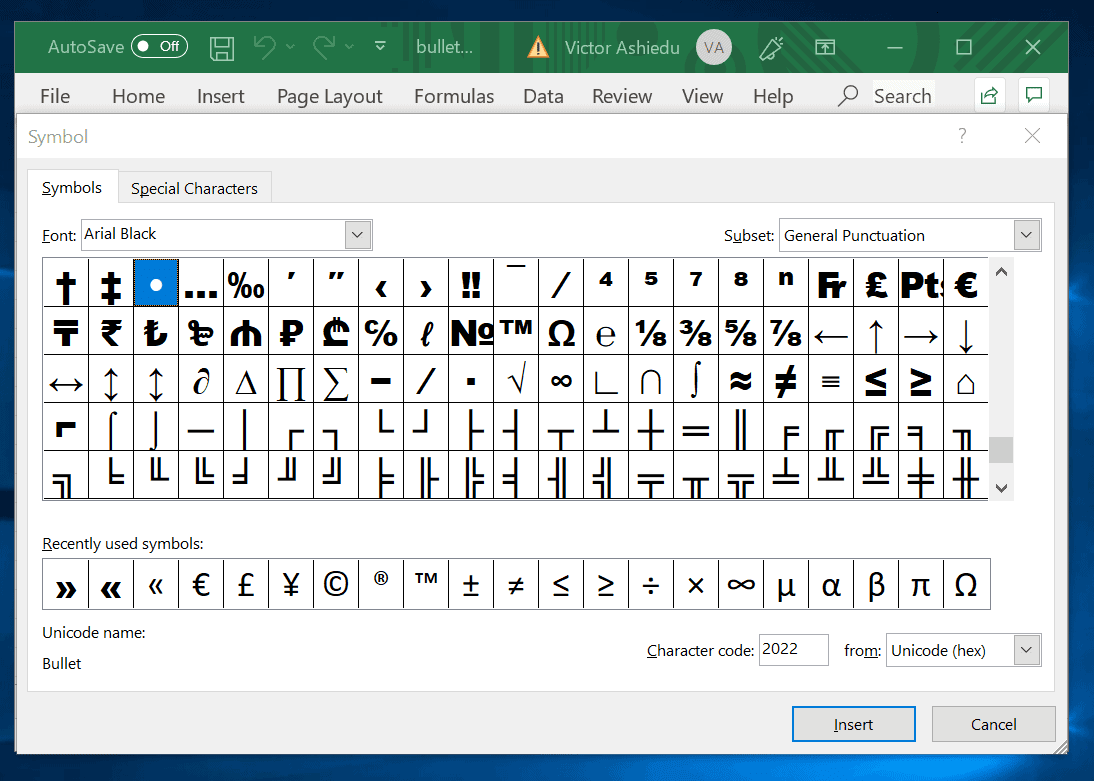
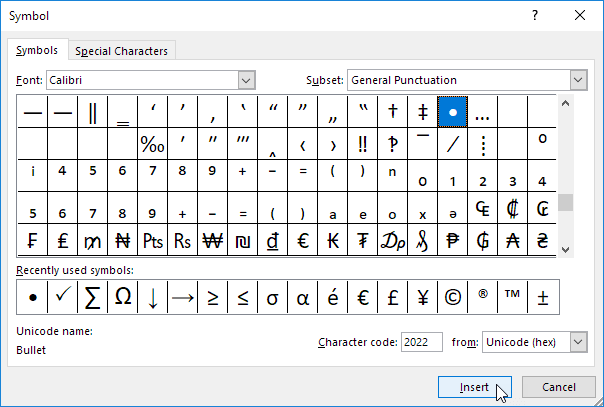
Web If you have a numeric keypad on the right side of your keyboard press ALT 7 for a bullet Different fonts provide different symbols If your font does not provide the bullet try selecting a font such as Wingdings in the Symbol dialog box Then enter character code 159
Web Mar 18 2023 nbsp 0183 32 Alt 7 Hold down the Alt key and press 7 on the numeric keypad to insert a regular filled circle bullet point Alt 9 For a ring bullet press 9 on the numeric keypad while pressing the Alt key Using Special Fonts Variety lovers this is another option for you use special fonts We are again talking about symbol fonts Earlier Web Make sure the numeric keypad is activated on the keyboard Place the cursor where the bullet symbol is required and then press and hold the Alt key and type the required alt code value from the above list and release the alt key Examples of bullet point alt code Alt 3 Alt 4 Alt 8729 Alt 8658
Web The alt code for bullet is 0149 Obey the following instructions to type this symbol using the alt code method Place the insertion pointer where you need the symbol Press and hold the Alt key on your keyboard Whilst holding on to the Alt key press the bullet alt code 0149 using the numeric keypad