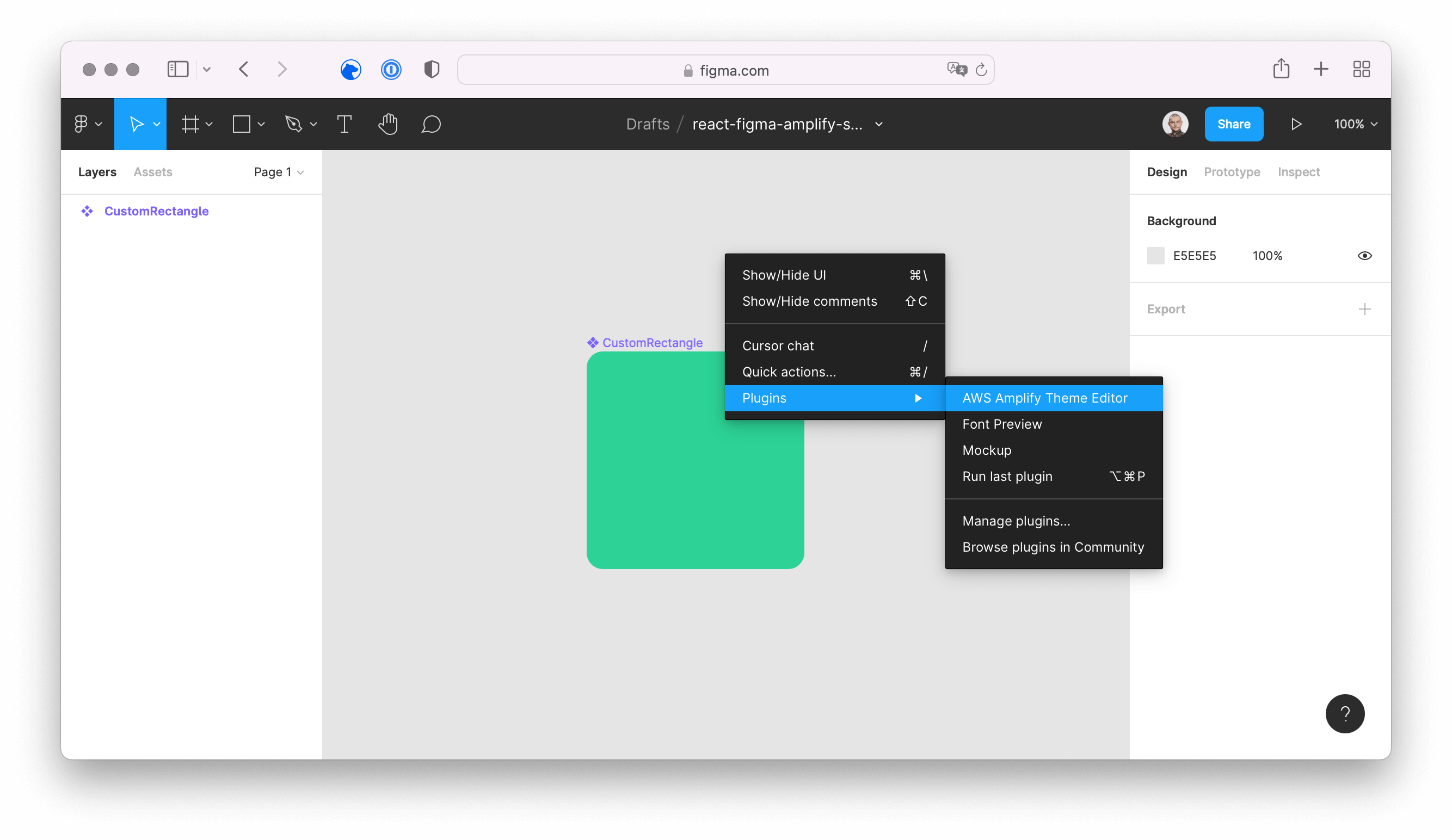
After Installing Aws Amplify Cli What Command Allows AWS Launches Amplify Studio A New Low code App Development Tool Deploying Existing AWS Amplify Projects Using The Amplify CLI YouTube Theming With Amplify UI AWS Amplify Studio And Figma Sebastian Theming With Amplify UI AWS Amplify Studio And Figma Sebastian Getting Started With AWS Amplify Web Amplify enables developers to develop and deploy cloud powered mobile and web apps Amplify Hosting provides a continuous delivery and hosting service for web applications For more information see the Amplify Hosting User Guide The Amplify Framework is a comprehensive set of SDKs libraries tools and documentation for client app development
Web AWS Command Line Interface support Use the AWS Command Line Interface to create Amplify apps programmatically from the command line For information see the AWS CLI documentation Web Aug 2 2020 nbsp 0183 32 To install the CLI we ll run the following command npm install g aws amplify cli Next we ll configure the CLI with a user from our AWS account amplify configure For a video walkthrough of the process of configuring the CLI click Add function In the root directory type amplify add function Follow these steps
Getting Started With AWS Amplify AWS Amplify CLI AWS Cloudformation Amplify Console Hosting AWS CLI Setup The AWS Command Line Interface NerdyElectronics Installing Configuring The AWS Amplify CLI YouTube Build A Flutter App With Very Good CLI And AWS Amplify GitHub Aws samples amplify nextjs chat app Combining NextJS AWS Amplify And Stripe To Build A Catering App part Understanding AWS Amplify Hosting Rapid Application Development With AWS Amplify Authentication Part 2 Sufle
After Installing Aws Amplify Cli What Command Allows
 After Installing Aws Amplify Cli What Command Allows
https://techcrunch.com/wp-content/uploads/2021/12/Screen-Shot-2021-12-02-at-9.28.29-AM.png
Web Sep 28 2023 nbsp 0183 32 Once you have Node js and npm installed you can easily install AWS Amplify CLI via npm Simply open your terminal or command prompt and run the following command npm install g aws amplify cli Now that you have successfully installed AWS Amplify CLI it s time to set it up
Templates are pre-designed files or files that can be utilized for different purposes. They can conserve effort and time by providing a ready-made format and design for producing different type of content. Templates can be used for personal or expert projects, such as resumes, invites, leaflets, newsletters, reports, presentations, and more.
After Installing Aws Amplify Cli What Command Allows

AWS Amplify CLI Installation Guide M1 M2 2022 Mac Edition DevsDay ru

AWS Amplify CLI AWS Cloudformation Amplify Console Hosting
AWS CLI Setup The AWS Command Line Interface NerdyElectronics

Installing Configuring The AWS Amplify CLI YouTube

GitHub Aws samples amplify nextjs chat app
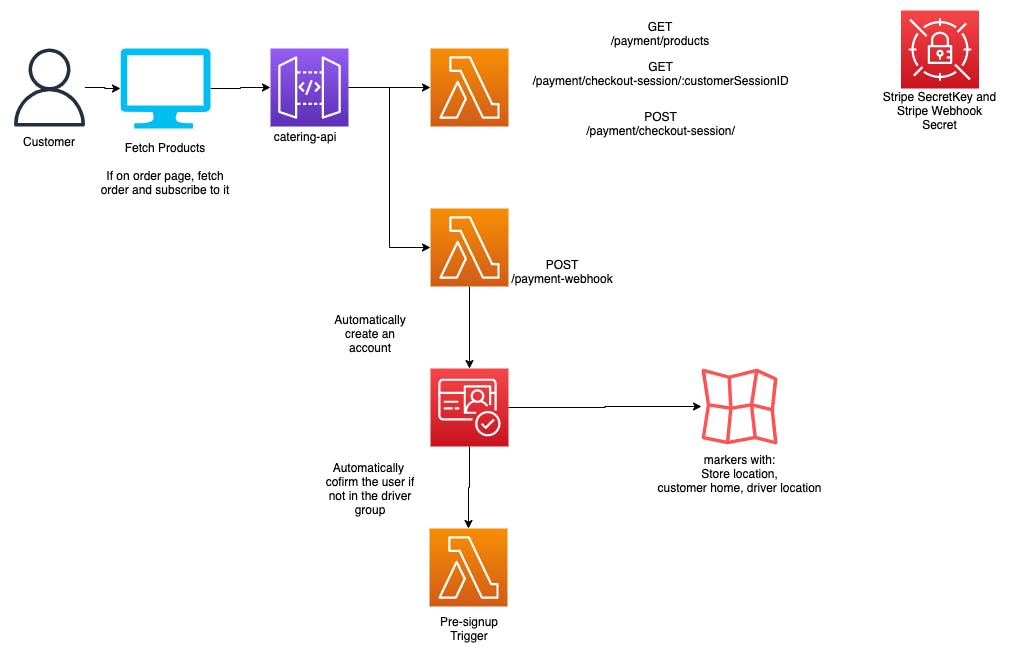
Combining NextJS AWS Amplify And Stripe To Build A Catering App part

Web Mar 28 2024 nbsp 0183 32 After you install the CLI navigate to a JavaScript iOS or Android project root initialize AWS Amplify in the new directory by running amplify init After a few configuration questions you can use amplify help at

Web Install and configure the Amplify CLI as follows npm install g aws amplify cli amplify configure Commands Summary The Amplify CLI supports the commands shown in the following table Category specific commands auth Amazon Cognito storage Amazon S3 amp Amazon DynamoDB function AWS Lambda api AWS AppSync amp
Web Oct 2 2019 nbsp 0183 32 The Amplify Framework is an open source project for building cloud enabled mobile and web applications Today we are happy to announce new features in the Amplify CLI that simplify the developer experience by enabling developers to get started from an existing Amplify project hosted on a Git repo by using a single command The amplify

Web The Amplify CLI toolchain is designed to work with the Amplify JavaScript library as well as the AWS Mobile SDKs for iOS and Android Resources in your AWS account that the Amplify CLI category commands create can be easily consumed by the corresponding Amplify library modules or native SDKs The Amplify CLI is written in Node js

Web Dec 5 2023 nbsp 0183 32 Run the CLI in debug mode f force Pushes all resources regardless of update status and bypasses all guardrails y yes Skip all interactive prompts by selecting default options allow destructive graphql schema updates Pushes schema changes that require removal or replacement of underlying tables
Web Mar 28 2024 nbsp 0183 32 Use the following commands to completely remove Amplify CLI from your system Removing the Amplify CLI will NOT delete any of your Amplify projects To delete a project run amplify delete within the project directory npm cURL Mac and Linux cURL Windows 1 npm uninstall g aws amplify cli Web Oct 16 2022 nbsp 0183 32 The AWS Amplify CLI command line interface is a set of programmable terminal scripts to create deploy AWS services for any application website or system There are 3 core ways to install the aws amplify CLI npm for NodeJS users npm install g aws amplify cli cURL for Mac Linux
Web Jul 1 2023 nbsp 0183 32 After setting up the account install the AWS Amplify CLI Command Line Interface on your local system You can do this by running the following command in your terminal npm install g aws amplify cli Then configure the AWS Amplify CLI with your AWS account using amplify configure