Adding Two Values In Excel Lookup Value Between Two Numbers Excel Formula Exceljet Find And Extract Common Values Between Two Lists In Excel Microsoft How To Automatically Create A Series Of Values In Excel Featured Image How To Count Count Distinct Values In Excel How To Sum The Top 5 Values In Excel Spreadsheets Made Easy Web There are a variety of ways to add up the numbers found in two or more cells in Excel This lesson shows you several methods including the SUM function and the Autosum
Web Mar 7 2022 nbsp 0183 32 Step 1 Click the cell in which you want to display the sum Step 2 Type an equal sign This indicates the beginning of a Web Nov 12 2019 nbsp 0183 32 It s easy to sum in Excel in two different ways to add a series of numbers together You can add two or more numbers using the AutoSum tool or by manually totaling them with plus signs
How To Sum The Top 5 Values In Excel Spreadsheets Made Easy How To Calculate Average Excluding Zero In Excel Haiper Compare Values In Excel 5 Ways Beginner To Advanced YouTube Calculate Between 2 Values Archives Excel Exercise ISLOGICAL Function In Excel Checking Logical Value Excel Unlocked Formula For Between Two Numbers Excel Riset Learn How To Hide All Values In Excel And Still Use Them In Your How To Count Text Values In Excel YouTube Excel VBA Select Case Between Two Values 6 Examples
Adding Two Values In Excel
 Adding Two Values In Excel
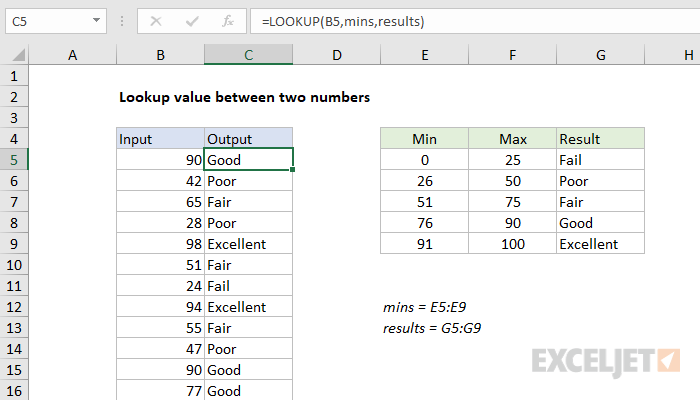
https://exceljet.net/sites/default/files/styles/original_with_watermark/public/images/formulas/lookup value between two numbers.png
Web Aug 27 2023 nbsp 0183 32 Steps Download Article 1 Open your spreadsheet in Microsoft Excel To do this double click the Excel document that contains your data in Finder Macs or File Explorer Windows Alternatively if
Templates are pre-designed documents or files that can be used for different purposes. They can conserve time and effort by supplying a ready-made format and layout for developing different type of material. Templates can be used for personal or professional tasks, such as resumes, invites, leaflets, newsletters, reports, discussions, and more.
Adding Two Values In Excel

Calculate Percentage Difference Between Two Numbers In Excel Riset
How To Calculate Average Excluding Zero In Excel Haiper
Compare Values In Excel 5 Ways Beginner To Advanced YouTube

Calculate Between 2 Values Archives Excel Exercise
Formula For Between Two Numbers Excel Riset

Learn How To Hide All Values In Excel And Still Use Them In Your
Web Combine data with the Ampersand symbol amp Select the cell where you want to put the combined data Type and select the first cell you want to combine Type amp and use

Web One quick and easy way to add values in Excel is to use AutoSum Just select an empty cell directly below a column of data Then on the Just select an empty cell directly below a column of data Then on the Formula tab

Web When it comes to adding multiple values in Excel the AutoSum feature can be a real time saver This tool allows you to quickly add up a range of values without the need for

Web Nov 16 2020 nbsp 0183 32 From the Formulas tab click the arrow icon at the right of Autosum Choose Sum Click the first number in the series Hold the quot Shift quot button and then click the last number in that column to select all of

Web Jun 21 2021 nbsp 0183 32 1 Open up your workbook 2 Select the cell you want to put all your data 3 Type and select the first cell you wish to combine 4 Type amp and use quotation marks with space enclosed 5 Select the other cell
Web Jun 29 2023 nbsp 0183 32 Step 1 Utilize the Addition Operator To use the Addition Operator for adding multiple cells we simply need to add the reference of each cell to be added with Web How do I sum just visible cells Sometimes when you manually hide rows or use AutoFilter to display only certain data you also only want to sum the visible cells You can use the
Web One of the primary methods for adding cells together in Excel is using the SUM function The SUM function allows you to add together the values in a range of cells It can be