Add Python Path To System Variables How To Add Python Path To Environment Variables In Windows 10 With How To Add Python Path To Environment Variables Manually How To Add Python Path To Environment Variables In Windows 11 YouTube How To Store Python Variables The Engineering Projects How To Add Python Path To Environment Variables In Windows 7 8 10 YouTube Web Feb 29 2012 nbsp 0183 32 1 Whenever I try to expirement with Python on Windows I always run into a wall with the import statements Python simply can t find anything on Windows every import even for something as core as timezone fails I know this has something to do with the PYTHONPATH environment variable In my case Python is installed to
Web The concept of this approach is to add the path of the python executable file to the Path environment variable so that the computer can search through the directories itself There are two different ways in which you can add the path to the environment variable Using The Python Set Up To Update Path Variable Web Sep 22 2023 nbsp 0183 32 Method 1 Install a Recent Version of Python You can easily add Python to Windows path by downloading a recent version of Python and then checking the box to Add Python to PATH at the bottom of the setup screen Add Python to PATH Finish the installation and you should be good to go
How To Add Python Path To Environment Variables In Windows 7 8 10 YouTube z ld Python No Such File Or Directory Hatas Technopat Sosyal How To Add Python Path To Environment Variables On Windows 11 How To Add Python Path To Environment Variables In Windows 10 8 7 How To Setup Python In Visual Studio Code How To Add Python Path To How To Add Python Path To Environment Variables On Windows 11 How To Set Python Path In Environment Variable In Windows 10 How To Add Python To PATH In Environment Variables Python Get Filename From Path Windows Mac Linux Datagy
Add Python Path To System Variables
 Add Python Path To System Variables
https://i.ytimg.com/vi/DuJUk4FCdmI/maxresdefault.jpg
Web Mar 22 2023 nbsp 0183 32 1 What is the purpose of adding Python to the PATH environment variable Adding Python to the PATH environment variable in Windows allows you to run Python commands from any directory within the command prompt Here are the steps to add Python to the PATH variable 2 What is the PATH environment variable in Windows
Pre-crafted templates use a time-saving service for creating a varied series of files and files. These pre-designed formats and layouts can be made use of for various individual and professional tasks, consisting of resumes, invitations, flyers, newsletters, reports, discussions, and more, enhancing the content production procedure.
Add Python Path To System Variables
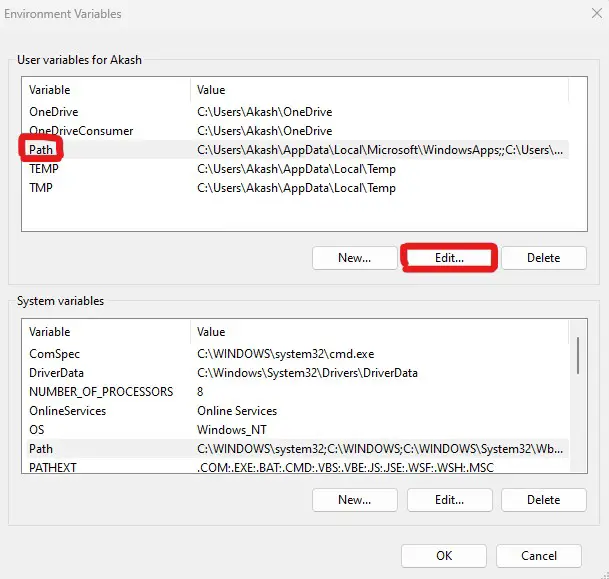
Add Python To PATH How To Add Python To The PATH Environment Variable

z ld Python No Such File Or Directory Hatas Technopat Sosyal

How To Add Python Path To Environment Variables On Windows 11

How To Add Python Path To Environment Variables In Windows 10 8 7
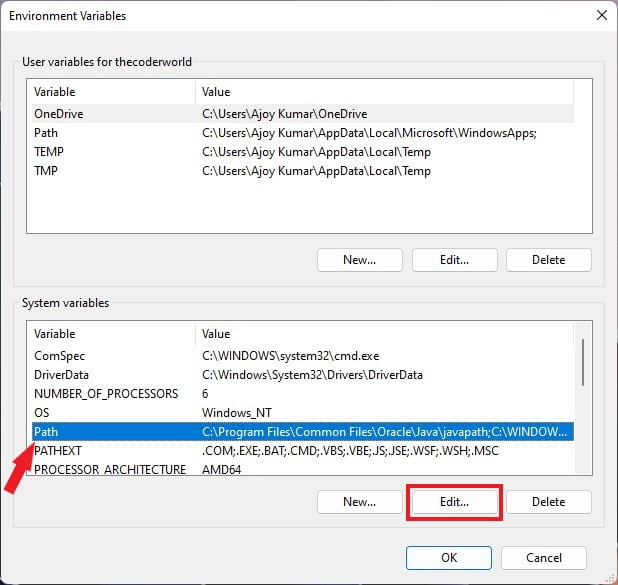
How To Add Python Path To Environment Variables On Windows 11
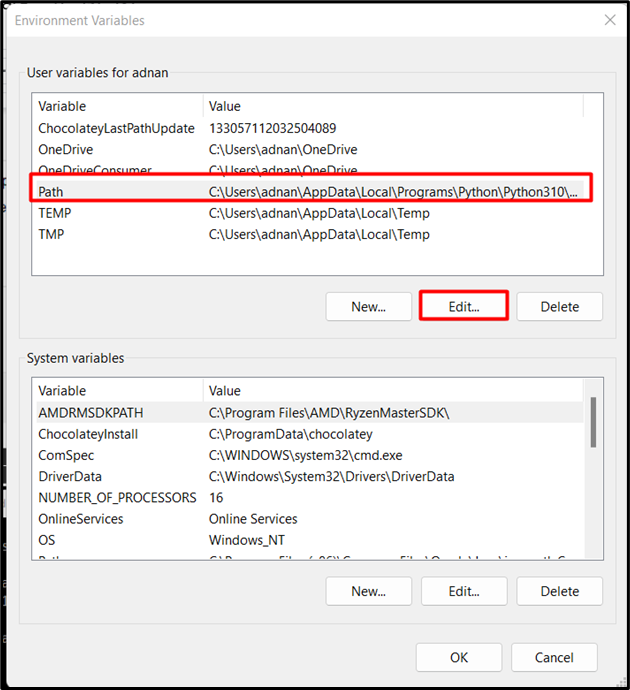
How To Set Python Path In Environment Variable In Windows 10

Web Sep 13 2010 nbsp 0183 32 The easier way to set the path in python is click start gt My Computer gt Properties gt Advanced System Settings gt Environment Variables gt second windows gt select Path gt Edit gt and then add quot C Python27 C Python27 Scripts quot link http docs python guide en latest starting install win Share

Web You can as a user click the top quot New quot button and add Variable name PATH Variable value C Python27 no spaces anywhere and click OK Once your command prompt is restarted any PATH in the User variables is appended to the end of the System Path It doesn t replace the PATH in any other way

Web Select PATH in the System variables section Click Edit Add Python s path to the end of the list the paths are separated by semicolons For example C Windows C Windows System32 C Python27 For Windows XP Open System Properties Type it in the start menu or use the keyboard shortcut Win Pause Switch to
Web Oct 13 2020 nbsp 0183 32 You can add Python to the System Variables PATH as well Although this is just an alternative and it s not necessary if you ve added it in the Users variables already To use the System Variables option follow the steps highlighted above for copying the Python path and its Scripts path
Web Apr 1 2020 nbsp 0183 32 Click on open file location and you will be in a location where Python is installed Copy the location path from the top by clicking over it Step 3 Add Python to Path as an Environmental Variable Now we have to add the above copied path as a variable so that windows can recognize
Web To add a new path for our Python program we will click on the quot New quot button on the right side and paste the path in Step 1 We have successfully added the path for our Python program to our system s environment variables The best practice is to restart the system afterward for the change to occur Web To add Python to PATH environment variable follow these steps Click on Start button from your Windows desktop Type environment variables and press Enter Click quot Environment Variables quot button on System Properties window Find User Variables listbox where PATH variable will be added for current user
Web To add the path to the python exe file to the Path variable start the Run box and enter sysdm cpl This should open up the System Properties window Go to the Advanced tab and click the Environment Variables button In the System variable window find the Path variable and click Edit