7zip Command Line Examples 39 LINE TV What Are The Technical Requirements For Motor Assembly Line Design And Tempo De Tela E Convers o De Vendas Uma Experi ncia On line F cil E 7 Zip Command Line Basics YouTube Windows 7zip Command Line Create Executable Jars YouTube Web Normal Compression method LZMA2 Dictionary size 16 MB Word size 32 Solid Block size 2 GB Number of CPU threads 8 8 Memory usage for Compressing 1184 M Memory
Web Jan 27 2015 nbsp 0183 32 7 Zip command to create and extract a password protected ZIP file on Windows closed Asked 8 years 11 months ago Modified 3 years 6 months ago Viewed 241k times 96 Closed This question does not meet Stack Overflow guidelines It is not currently accepting answers Web means all files with a second character of quot a quot 1 means all names that contains character quot 1 quot means all names that contain two at least quot quot characters The default wildcard quot quot will be used if there is no filename wildcard in the command line Slash at the end of a path means a directory Without a Slash at the end of the
Windows 7zip Command Line Create Executable Jars YouTube 7Zip Command Line Exclude Folder s By Wildcard Pattern YouTube Windows How To Open Archives In 7zip File Manager Using Command Line Command Line 7Zip To Create Archive Without Extension YouTube 7Zip Command Line Exclude Folder s By Wildcard Pattern YouTube How To Recursively Extract All tar And tgz File Zipped In A tgz File Phoenix X Breast Cancer Commercial Command Center Para Android Download
7zip Command Line Examples
 7zip Command Line Examples
https://img.linetv.tw/large/drama/17005-p_241230.jpg
Web Command Line Version User s Guide 7z exe is the command line version of 7 Zip 7z exe uses 7z dll from the 7 Zip package 7z dll is used by the 7 Zip File Manager also 7za exe a alone is a standalone version of 7 Zip 7za exe supports only 7z xz lzma cab zip gzip bzip2 and tar formats 7za exe doesn t use external modules
Pre-crafted templates use a time-saving service for developing a diverse variety of documents and files. These pre-designed formats and layouts can be used for numerous individual and professional projects, consisting of resumes, invites, flyers, newsletters, reports, presentations, and more, simplifying the content development procedure.
7zip Command Line Examples

7Zip Command Line Exclude Folder s By Wildcard Pattern 3

7Zip Command Line Exclude Folder s By Wildcard Pattern YouTube

Windows How To Open Archives In 7zip File Manager Using Command Line

Command Line 7Zip To Create Archive Without Extension YouTube

How To Recursively Extract All tar And tgz File Zipped In A tgz File

Phoenix X

Web Here we see an example of the quot d quot command in 7 Zip command lines This stands for delete and is used much less often It allows you to remove a certain file or set of files from inside an archive Note You will need this if you use huge archives and need to save time This is from the manual
Web 7z x example zip oexample Usage 7z lt command gt lt switches gt lt archive name gt lt file names gt lt listfiles gt lt Commands gt x eXtract files with full paths lt Switches gt o Directory set Output directory Edit 7z x zip o extracts all zip archives to subfolders with names of these archives

Web Examples The default wildcard quot quot will be used if there is no filename wildcard in the command line Slash at the end of a path means a directory Without a Slash at the end of the path the path can refer either to a file or a directory List file
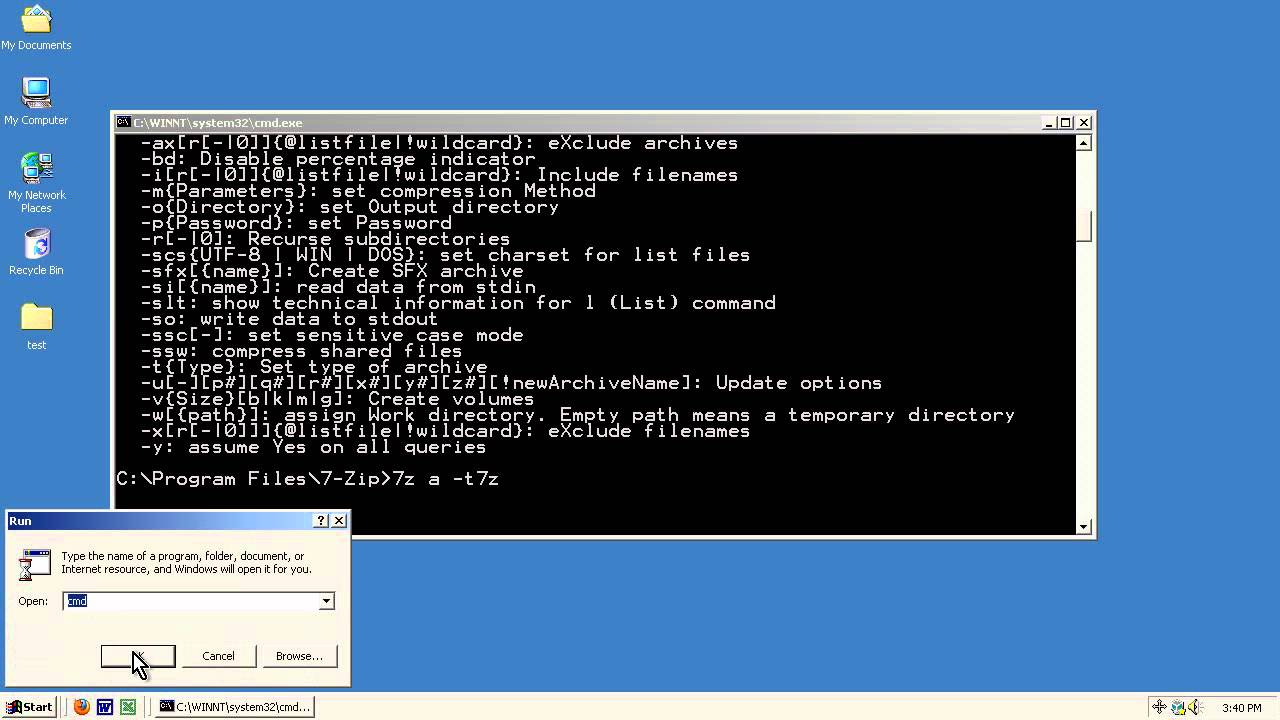
Web Sep 2 2009 nbsp 0183 32 I m creating a backup utility that zips all the files listed in a text file I am using MS ACCESS as my front end and 7 Zip for compression These are the commands I am using 7zG exe a c Backup backup zip c temp tmpFileList txt All the files are compressed without their path

Web Command Line Commands The command is the first non switch argument on the command line Command names are not case sensitive See also Command Line Syntax for more details about using the command line
[desc-11] [desc-12]
[desc-13]